Let AI Run Your Projects: Tips and Real Cases
Project Management AI Guide
Hello friends!
According to KPMG, companies that lean on AI report an average productivity boost of 15% on their projects! Not bad for a digital assistant.
PMI’s research, “AI innovators: Cracking the code on project performance”, shows even more:
- Teams using AI tools hit deadlines 61% of the time, compared to 47% for those going old-school.
- AI-driven projects are more likely to actually deliver on promised results 69% of their projects meet 95%+ of expected business benefits, vs. 53% for non-AI projects.
- Projects with AI support hit or beat ROI targets 64% of the time, compared to 52% without AI.
AI supports project managers in coordinating all the moving parts to make sure projects get done on time, on budget, and up to standard. But project management isn't just for professionals.
Even if you’re not a project manager, you deal with personal projects every day, such as fixing things around the house, planning trips, and so on.
And let’s be real, most projects go off track at some point. Sometimes it’s human error, missing materials, too many dashboards, endless messages, and updates scattered across platforms.
That’s why today, we’re looking at how project managers are using AI, so you can get some insights on how to make your professional or personal project management way less stressful with the right tools in your corner.
Keep your mailbox updated with practical knowledge & key news from the AI industry!
AI in Project Management
If you’ve ever felt like you’re running on a hamster wheel, welcome to the daily reality of a project manager.
Project managers are responsible for any collaborative project. They sit between teams, stakeholders, deadlines, and expectations. They work across product teams, agencies, startups, anywhere things are done by people who don’t all think the same way.
And they operate in a constant noise of tools such as Jira, Trello, Asana, ClickUp, Notion, Slack, Teams, as well as calendar invites, dashboards, and docs.
Of course, keeping multiple complex workstreams is exhausting.
According to the World Economic Forum, by 2027, around 42% of work tasks are expected to be automated. Which means one thing: a huge share of companies has already brought AI into their project workflows in one way or another to get rid of tedious work.
So, a regular ChatGPT or Claude can’t help there, because they lack persistent context, structured reasoning, decision continuity, and the ability to integrate with the tools teams actually use.
We’re talking about companies building systems where AI is integrated into stateful decision-making over time, task delegation, and tracking analytics based on changing data.
And people who know how to work with modern AI project management platforms, what tasks to delegate, and how to interpret the results are going to be way more valuable on the market.
Here’s the first example to show what I mean.
AI Scrum Master in an Agile Team
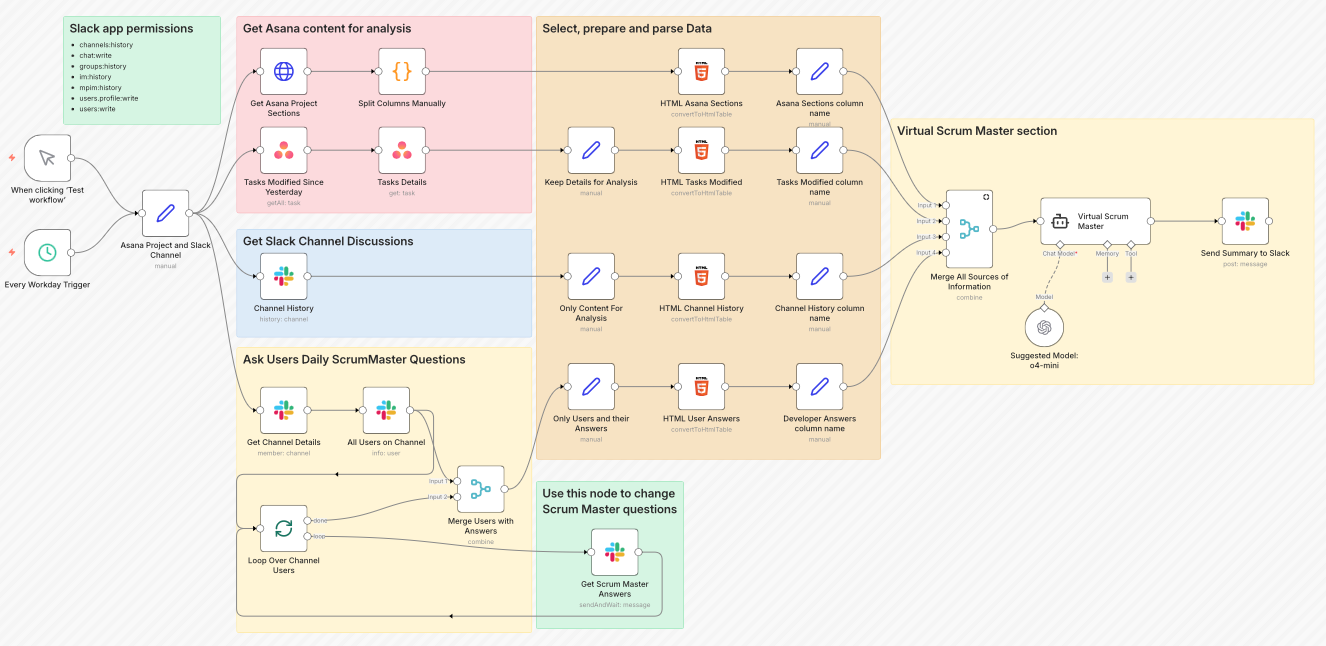
This setup acts like a Scrum Master that never sleeps.
Best for:
- Small teams (up to 15) to catch blockers early and replace manual check-ins
- Mid-size teams (15–50) to surface hidden dependencies and provide visibility if you work remotely
- Large teams (50+) to detect patterns people can miss and support coordination without micromanagement
Why it's clutch
This system is simple. It pulls data from multiple sources:
- Asana - project structure, tasks, progress
- Slack - team chats, discussions
- Direct developer input - updates, blockers, support needs
All of this runs through…n8n, of course! Then AI analyzes it in the context of Scrum, spotting potential roadblocks, areas where the team might need a hand, and risks of hitting sprint goals.
Outputs land in Slack (or any place you choose, the system is versatile to changes), ready for the team or the next round of analysis.
Impact
On par with you, AI helps:
- Keep track of tasks and team progress
- Spot risks and bottlenecks early
- Boost team efficiency and transparency
Project Manager Assistant Agent
Setting up a project isn’t easy.
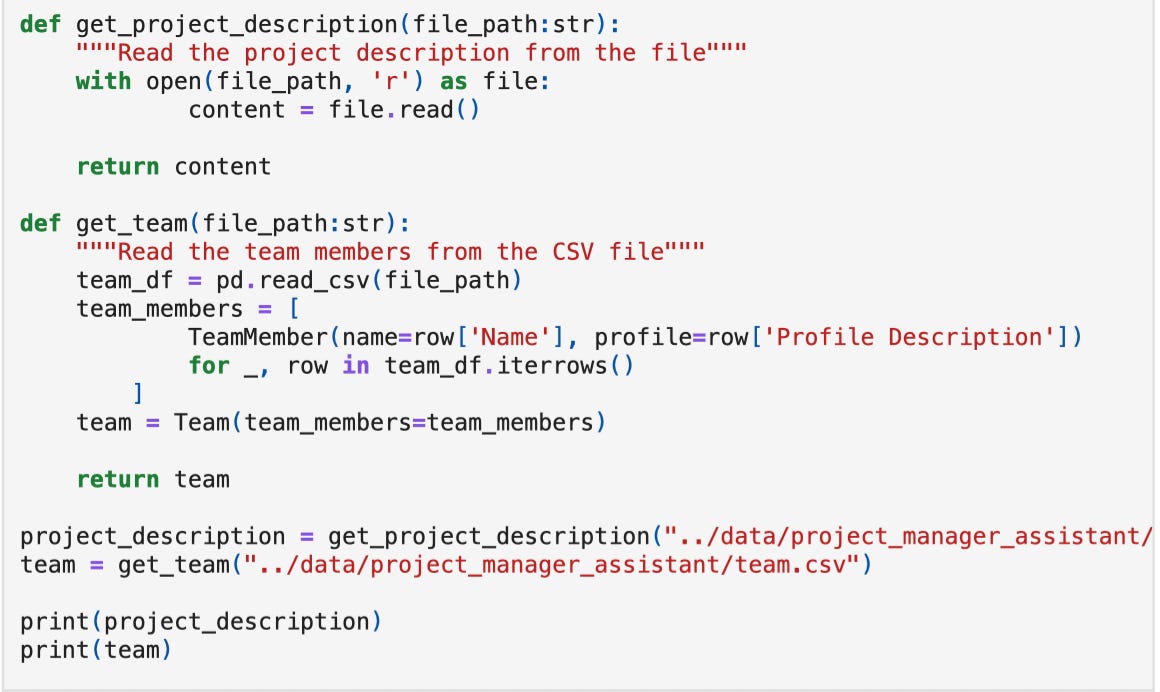
If you already have a project idea and a structured team, but don’t know where to start, this system can be helpful. For example, you can input your team data and add a project description such as: “Our business aims to deliver a chatbot application for our customers to ensure 24/7 support and advice on product choices.”
In the overview of the system, you'll learn how to properly introduce these details.
Just like this, you don’t need to spend days sorting out tasks and scheduling timelines. This agent will make it for you, and also help with risk assessment across team members.
Best for:
- Small teams (up to 15) to replace days of planning and prevent early mistakes
- Mid-size teams (15–50) to handle cross-team dependencies
You don’t need it if
- Your team is 1–3 people
- And your work is ad-hoc
Why it’s clutch
This AI system aims to translate a project description into a structured plan. It:
- Breaks the project into actionable tasks
- Maps dependencies between tasks
- Schedules tasks while respecting dependencies
- Assigns work to team members based on their skills and availability
- Assesses risks for tasks and the overall project
- Generates insights to optimize the plan in multiple iterations.
This thing doesn’t just track projects, it actually makes decisions! The fact that it can smartly assign team members caught me off guard.
How It Works
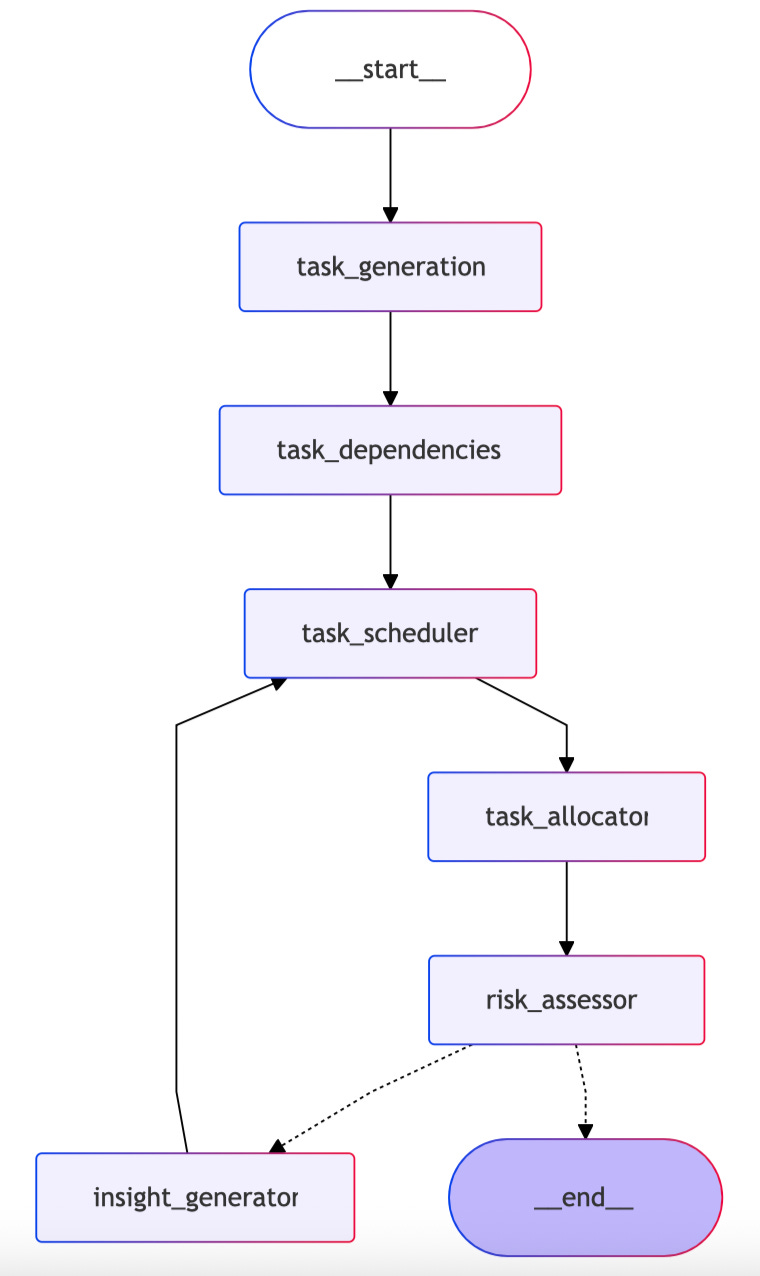
- The system is all about LangGraph managing the agent workflow as a series of nodes.
- AI (GPT-4o-mini is used in this case, but can be used with any other LLMs) interprets the project description, generates tasks, schedules, allocations, and insights.
- Inputs include project description files, team profiles, and task details.
Workflow: The agent iterates through task generation → dependency mapping → scheduling → allocation → risk assessment → insight generation, optimizing each step based on feedback.
- Output presents a structured project plan with Gantt charts, risk scores, and recommendations, ready for the team to act on.
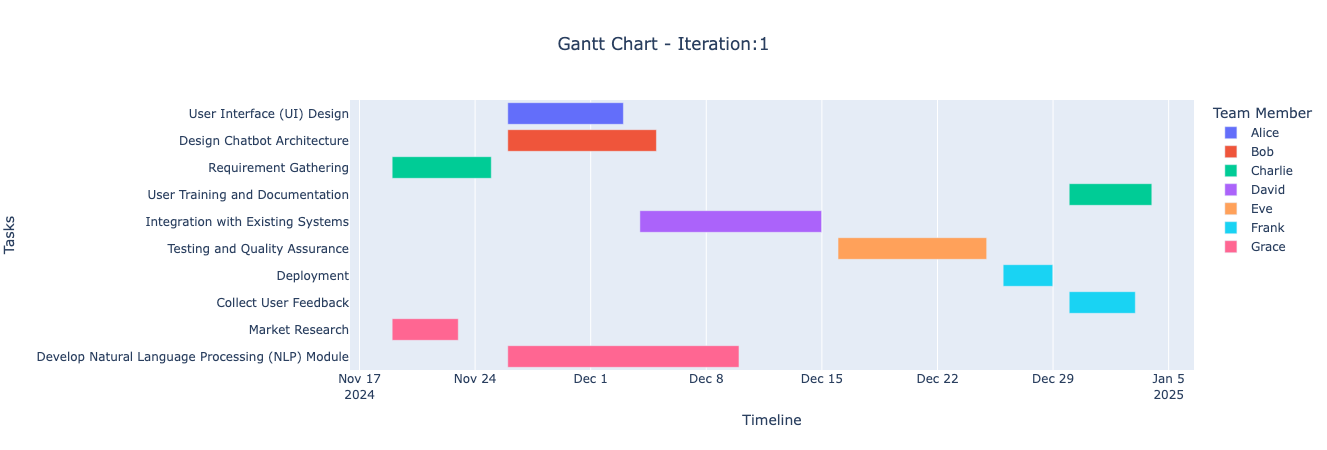
a visualized output for an agent-derived project
Impact
The author is using this system to transform messy project planning. Here’s what it delivers:
- Turns a simple project description into tasks, dependencies, and timelines without manual planning
- Assigns risk scores (0-10) to each task based on complexity, team capacity, and dependencies. Like this, we can catch problems from the beginning
- Distributes work across the team based on their expertise and availability
- Runs multiple planning cycles to reduce overall project risk and improve scheduling
- Generates instant Gantt charts and project roadmaps (no one slips through your attention 👀)
All in all, this system helps speed up the start of a project.
Once it has turned all your data into a structured plan in the form of tables and task details (they appear as JSON/Pydantic files), you can do pretty much anything:
- use it as a base to import into Jira or turn it into a Notion database through the API or CSV.
- create a Gantt chart or roadmap
- Or just show a presentation to the client at the very beginning with a prepared plan.
Agentic Project Management
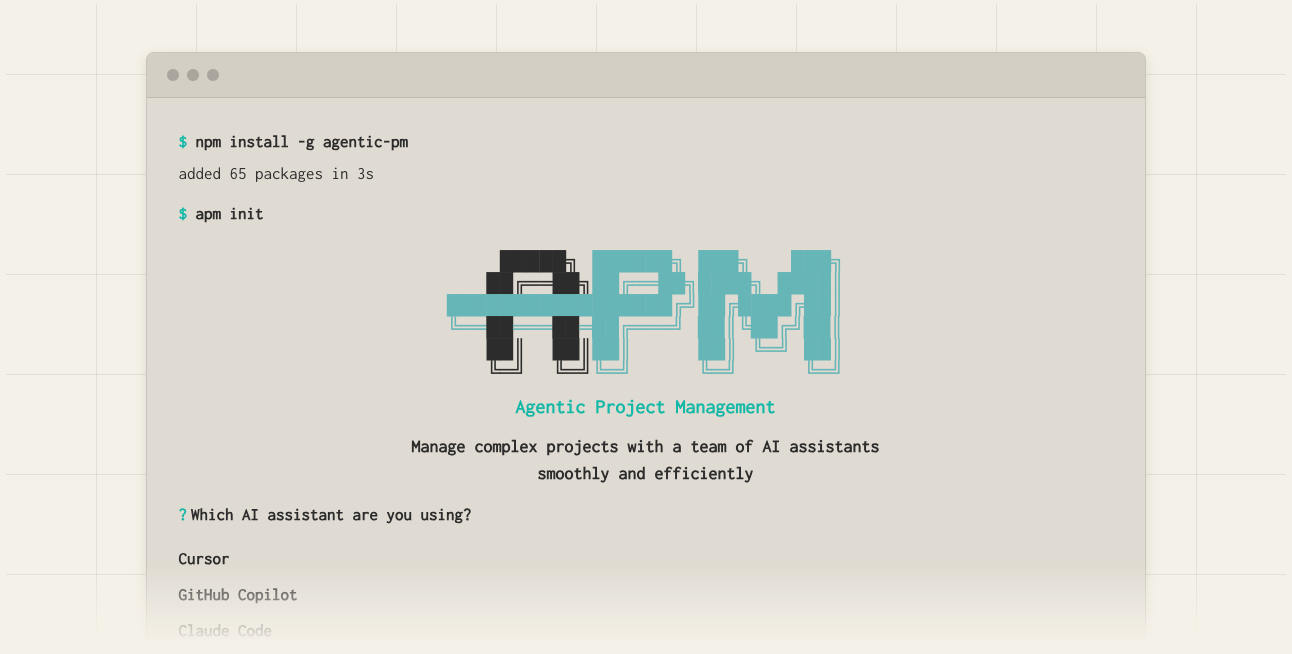
This is an AI-powered project management framework that helps you tackle multi-stage projects.
We’ve already talked about how AI IDEs help you shape and preserve your data infrastructure. This is exactly that case: you’re not starting from scratch every time, as you do with regular chat-based AI. The system remembers what mattered, why, and what choices were made.
Best for:
- Small teams (1-15 people) to kick off projects faster
- Medium to large teams (15–50+) to plan and simulate risks
It’s not a replacement for PM tools. The output is embedded into tools like Jira, Asana, or ClickUp, which remain the execution layer.
Why it’s clutch
- Before doing anything, the assistant designs a roadmap with phases and tasks
- It uses a Dynamic Memory Bank to store context and logs for each task and phase, so AI doesn’t forget what’s important
- Tasks are small and actionable, so they’re easy for AI agents to handle in one go
- When context limits are reached, the workflow has a clear handover procedure to transfer all relevant information to a new agent session
How It Works
Phase 1: Initiation
- Install APM CLI (one-time setup):
npm install -g agentic-pm   # global install
# or local install:
npm install agentic-pm- Initialize your project in the terminal:
apm initPhase 2: Select your AI assistant
You open your AI IDE (VSCode, Copilot, Cursor, Windsurf)
- Paste in the Manager Initiation Prompt (this is usually in .apm/guides/ or presented directly in your terminal after apm init)
- The Manager Agent asks you strategic questions about the project to build a high-level contextual understanding
- Options:
+ You describe the project goals yourself. + Or the Manager Agent queries project details efficiently.
- After 3-4 exchanges, the Manager Agent has enough info to generate an
Implementation Plan:
- Divided into Phases > Tasks > Subtasks.
- Each task is assigned to an Implementation Agent.
- Goal: keep tasks small and easy for AI to handle.
Phase 3: Dynamic Memory Bank
- Memory evolves alongside project execution
- Each Task gets Memory Logs that store context, progress, and decisions
- Memory for later phases is created only when needed, preventing wasted storage or outdated context
This ensures flexibility and context retention
Phase 4: Main Loop
Manager Agent generates a Task Assignment Prompt for the Implementation Agent.
It includes:
- Task details
- Required previous context
- Logging instructions (write to Memory Log)
Execution:
- The Implementation Agent completes the task.
- Logs results and issues into the Memory Log.
Review & Feedback:
- The user reviews the Memory Log.
- Depending on the situation:
+ Confirm success to move to the next task + Task blocked to assign Debugger Agent or provide follow-up instructions
- The loop continues until project completion.
The whole setup you can find here: click
Impact
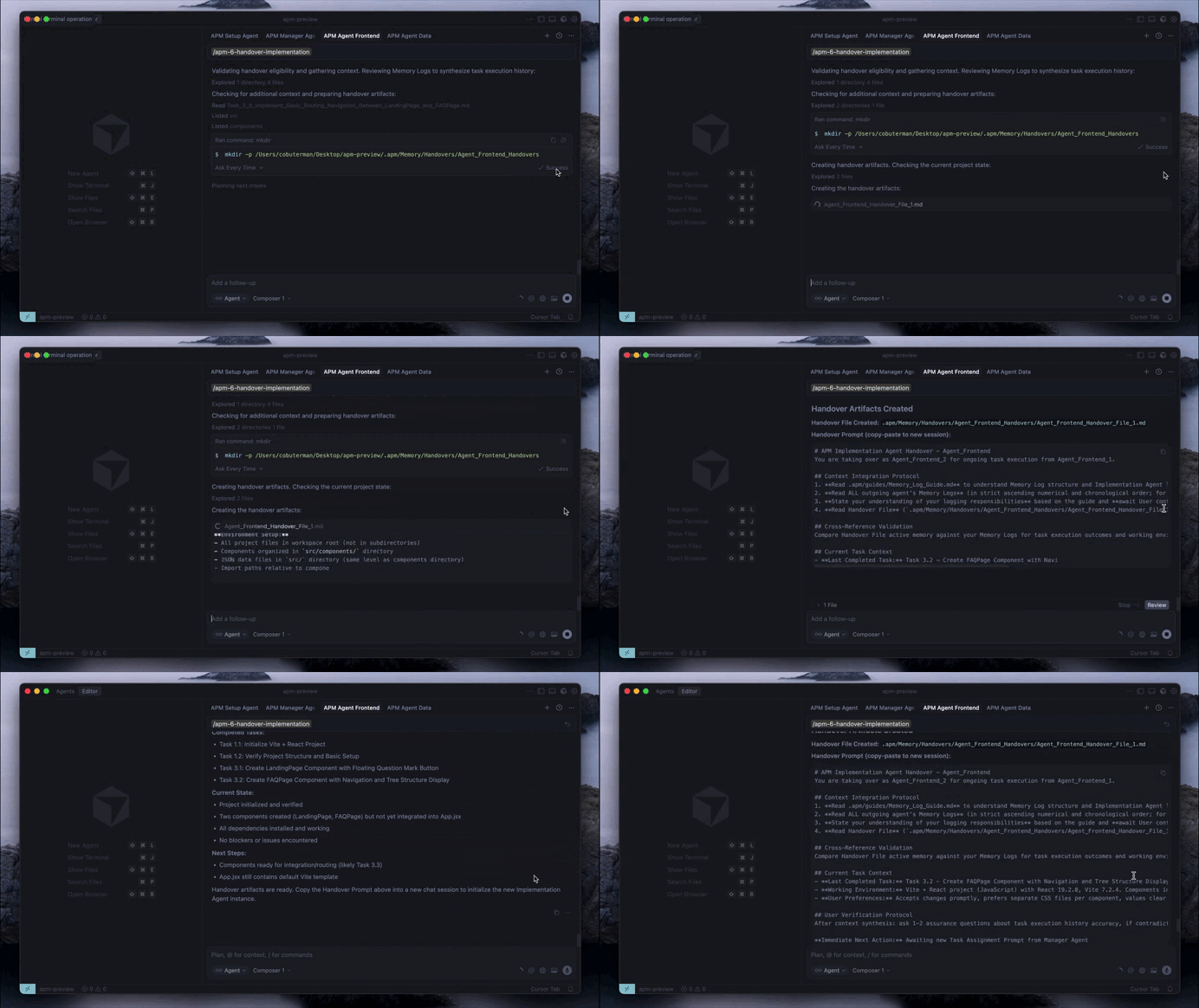
This is how the system implements your tasks
- Tasks are broken down for cheaper models
- Dynamic Memory Bank + Handover keeps all critical info
- Manager oversees, Implementation Agents execute, Debuggers troubleshoot
- The system can be adapted to many AI IDEs and models
The real value isn’t in replacing PMs or Scrum Masters. It’s in giving them superpowers to not worry about blind spots and manual planning, and giving more time to focus on people and strategy.
Practices & Tips for Using AI in Project Management
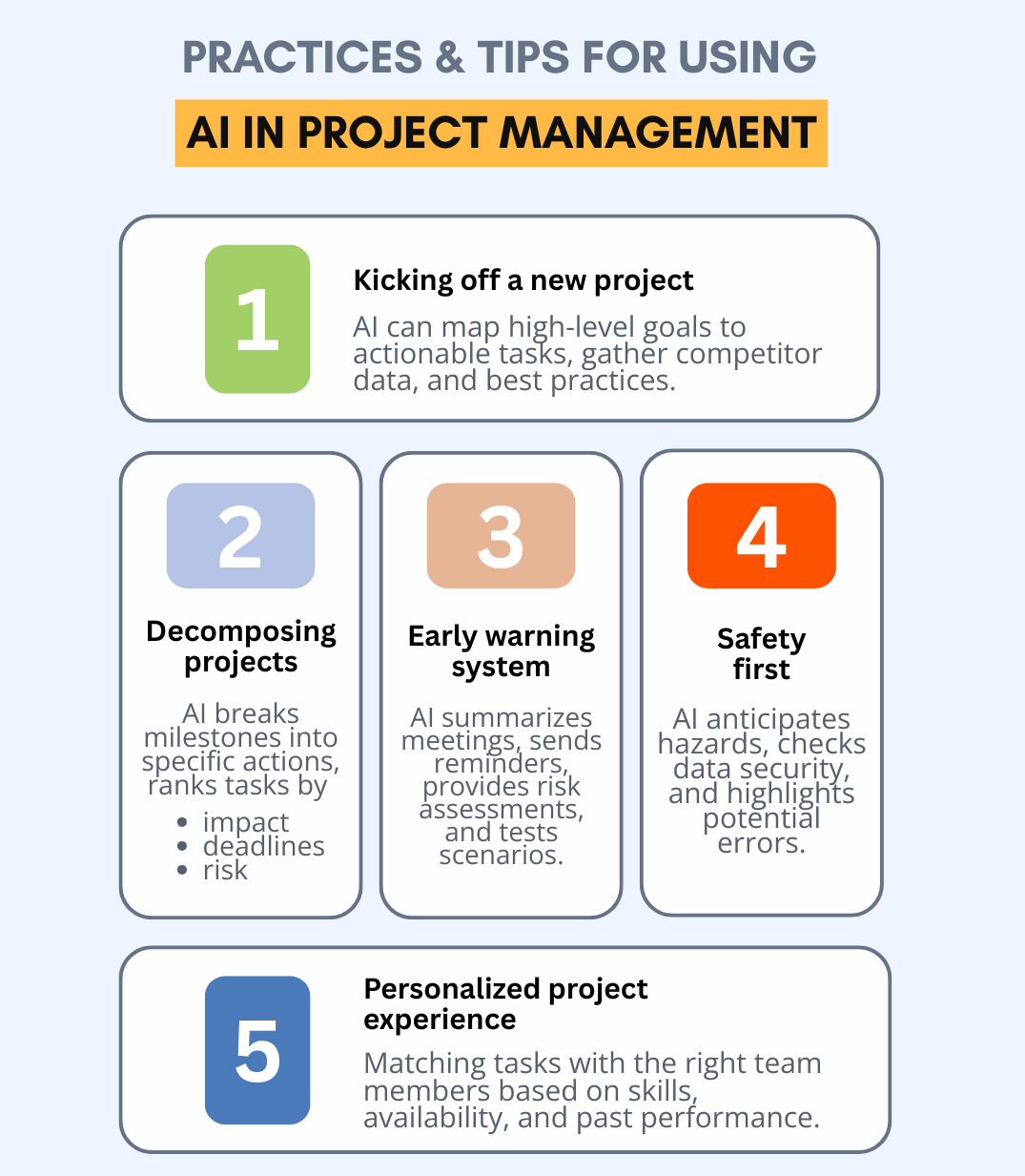
We’ve seen the cases; now let’s lock in the basics.
Kicking off a new project
AI can map out the route from “We want to do this” to “Look at this cool project.” This is especially valuable for large projects with multiple teams working together.
You can ask to:
- Gather competitor data, similar projects, industry standards, and best practices. To do it, use the system from our third case above or tools like Hebbia AI and ClickAI. These tools help search through documents and spreadsheets to organize your findings.
- Decompose projects from high-level milestones down to specific actions.
- Rank tasks by impact, deadlines, and risk factors.
Break down data
AI integrates data from multiple tools into one cohesive system. Instead of jumping between Jira, Slack, Google Sheets, and email to piece together project status, AI consolidates everything into a single dashboard with real-time updates.
Similarly, Siemens integrated historical project data and external factors into an AI system to get more accurate timeline predictions and smarter resource allocation. This led to a 30% reduction in scheduling conflicts and improved resource utilization.
You can ask to:
- Scan portfolio and identify emerging bottlenecks
- Suggest which projects to postpone based on strategic value, resource constraints, and impact on other projects
- Provide testable solutions BEFORE bottleneck impacts flow
While AI is running on the background, you can actively engage with your team and stakeholders, establishing regular checkpoints and clarify goals earlier
Early warning system
AI tools can summarize meetings, draft quick status updates, follow-ups, reminders, and even translate updates for global teams.
This way, you can ask to:
- Test practical solutions: resource reassignments, postponing projects
- Compare scenarios side-by-side, like “what happens if we hire someone...”
For example, IBM is using AI to automatically generate risk assessments and receive mitigation strategies.
Check out how this creator uses AI to quickly analyze calls here.
Safety first
Some companies, like Bouygues in construction, use AI to anticipate hazards and improve safety protocols. AI can assess the state of data security, algorithm bias, and integration complexities.
Feed AI your safety logs regularly; small errors can become big lessons if ignored.
Personalized project experience
AI adapts to the unique needs of different stakeholders, giving each team member a personalized project experience. This keeps everyone aligned on shared goals.
AI can match tasks with the right people based on skills, availability, and past performance. If a milestone is in trouble, it can suggest who should step in.
Project Manager AI Toolkit
It’s about layering planning, execution, automation, and communication.
Core PM Platforms
These tools usually keep projects visible and under control.
📌 Asana / Asana Intelligence
Asana works for teams of any size. Its main goal is to help teams track and organize work so everyone knows who’s responsible for what and what’s in progress.
In addition, its AI features, like Recommended Projects, Top Projects, and Portfolios, adapt to your activity and interactions. They highlight the most relevant projects and workspaces so you jump straight into what matters.
It also helps you manage your Inbox and tasks. Priority Inbox surfaces the most important updates, while Task Recommendations proactively suggest high-priority work exactly when you need it.
📌 ClickUp / ClickUp AI
ClickUp is a digital workspace. It combines office apps, chat, spreadsheets, email, and more.
It gives managers and their teams all the tools of the trade in a single platform to manage projects, summarize content, and generate reports.
On top of this, you can set up different AI agents depending on what you need:
- Super Agents handle multi-step workflows across your workspace
- Autopilot Agents follow triggers and rules to automate repetitive actions
- Ambient Answers respond to team questions with context-aware answers.
ClickUp AI also connects with external AI tools like ChatGPT, Cursor, or Claude through its MCP.
📌 Monday
Monday is great if all you need is a simple way to keep tasks in check, assign them, and set deadlines.
Сompare to the two previous tools, this one is perfect for solo freelancers or tiny teams who just want a clear visual board and minimal setup.
If your team grows and you need heavy automations or CRM features, Monday can get pricey.
Talking about AI features, recently the company has introduced Monday AI Notetaker. It can join your meetings, transcribe, and summarize them, syncing notes with your Monday workflows (but it’s limited to Pro/Enterprise users).
📌 Notion Notion AI helps turn notes into action items (you already know how insane the tables and databases in Notion can get. AI can analyze all the info across your tables and spot gaps and even suggest next steps for your projects.
It’s great for planning, documentation, stakeholder-friendly visibility, and workload balancing.
Execution Layer
Perfect for taking all your plans, notes, and historical project context and turning them into actual output, implementing tasks, generating specs, and refactoring logic.
Maybe you’ll spot something that went wrong in a project three years ago and avoid making the same mistake this time.
Make sure all relevant knowledge is captured and reusable.
Automation & Integration
The glue between AI and the real world. Pulls data from Slack, Jira, Asana, Notion, APIs, and pushes insights back automatically.
Best for: Automatic status updates, sprint summaries, risk alerts, reports without manual control
The final words
No doubt that every project is different, whether in scale or management style. But there’s ALWAYS a layer of repetitive tasks that take time without adding real strategic value. As we’ve seen through today’s streamflows, the right AI tools can cut down on busywork and reduce human errors.
Moreover, agentic systems break big projects into manageable chunks, keep track of context, and hand them off when needed. AI is great at spotting patterns and automating boring tasks, but we are still here when it comes to strategy, dealing with stakeholders, and solving tricky problems.
This article was first published in the Creators AI newsletter. View the original edition.