AI Can Teach You Anything
2 New Learning Tools + 5Step GPT4o AI Tutor Guide
Hey Creators 👋
Learning anything can be a drag. Perhaps you’ve tried many ways to learn something new, like re-reading, returning to the topic after some time, and trying to recall the information — maybe you nerded out and created flashcards. These methods all fall short when it comes to making the process both engaging & efficient — and this is where AI makes learning fun & optimized.
In today’s post, we’ll cover:
- Two tools that can optimize your learning & be your second brain
- Their perfect synergy & how to use both tools effectively
- A 5-step guide to creating your own private tutor with GPT-4o (in case you don’t want to sign up for two whole new tools and whip out your credit card)
Let’s not waste any more time and get straight to it!
$~~999~~ Course In 10 Minutes?
WisdomPlan — a unique AI tool that creates personalized courses for you. It gathers all the resources, plans the sequence, and even gamifies your progress to make learning fun and engaging!
And here’s a more in-depth breakdown of creating an AI learning plan with visuals:
First, set your goal, like becoming proficient in Python. Describe your background, previous knowledge, and preferred learning resources (videos, articles, blogs). Then, set your available learning time and deadline.
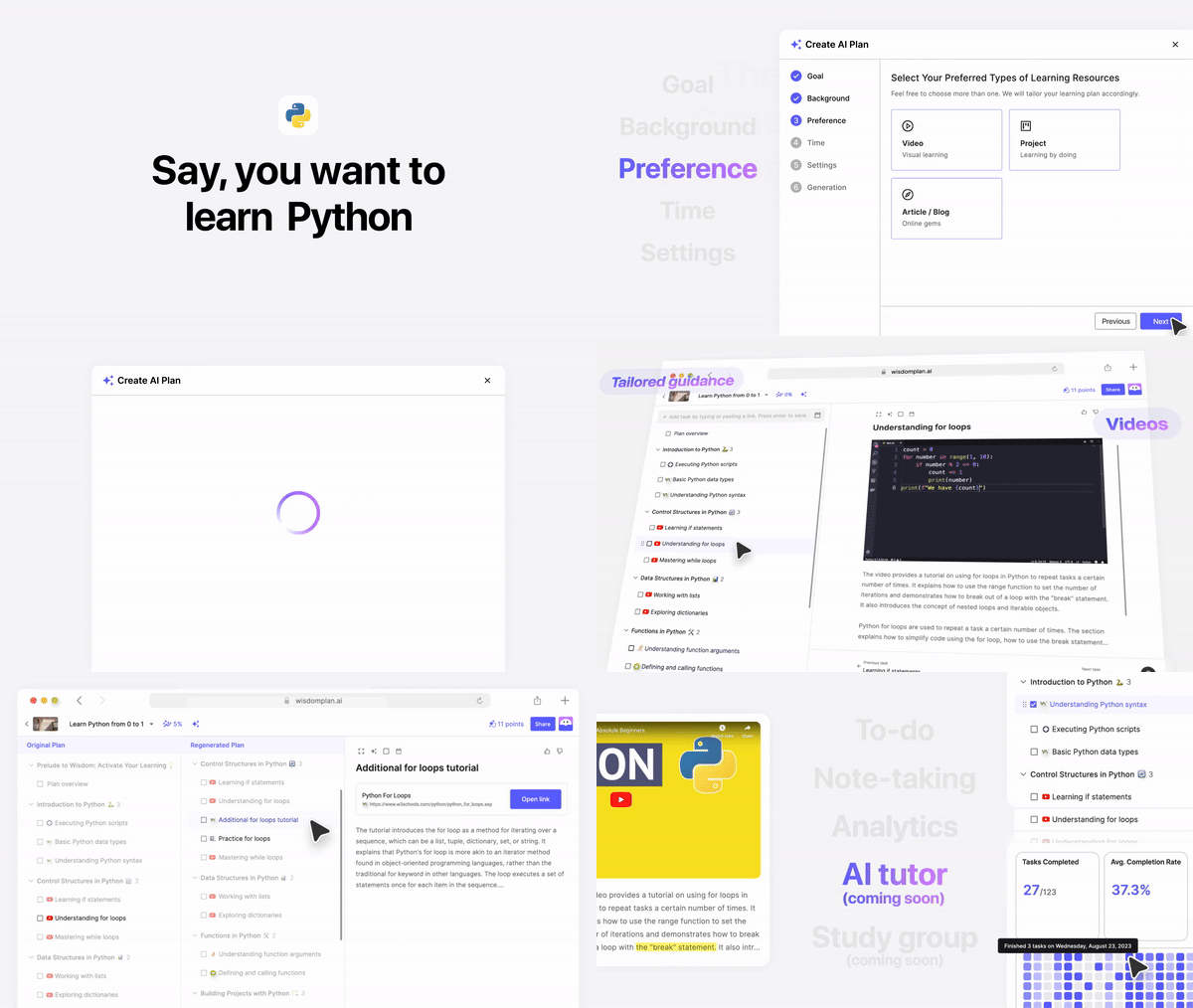
And despite what the visuals say, it usually takes about 10 minutes for WisdomPlan to gather all of the resources and package them into an easy-to-consume course.
Each segment in the course links to specific text tutorials, YouTube videos, and documents, all tailored to your AI plan. The course is structured step-by-step, based on your weekly commitment and deadline. This way, you won't get overwhelmed with information and can easily follow your personalized learning path!
While WisdomPlan does have a few other features, like a to-do list and note-taking, that isn’t the tool’s main purpose — it’s creating a personalized course to learn anything you want.
On its own, it’s just a glorified checklist of materials to go through. We need a personal knowledge management (PKM) system to consume the course content mindfully and save as much time as possible while learning something new.
Also, in case you’re curious about how to create a course using AI that you can actually sell to people, check out our post here:
Do you have a minute to participate in our Subscription Giveaway and make our newsletter even better? Take a quick survey and tell us about your experience & participate in the free Giveaway of a Premium Subscription for 6 months.
Add +32GB of RAM To Your Brain
MyMemo — this is an AI-powered PKM system that organizes, analyzes, and retrieves digital content for you, which is then turned into a very rich knowledge base, effectively extending your brain’s memory into the digital.

At the start of the visual above, the user is in the tab “AskMemo” — this feature lets you chat to your “memos”, in other words, talk the information that you gather!
You can probably already see the synergy this tool can have with WisdomPlan, but just sit tight, we’ll show you exactly how to use both tools efficiently soon!
What sets MyMemo apart from traditional PKM systems like Notion & Obsidian is that MyMemo requires exactly zero organization.
You don’t need to create folders or add tags since you can just add tens of videos & articles to your collection, and ask the AI questions, and it will find everything FOR you — it promises easy, instant access to all of your stored information, without any tedious organizing.
Another crucial feature is “reflective AI learning with recaps” — MyMemo helps you retain & encode information via personalized recaps. This is a short & bursty way never to forget an important topic again.
Learning Will Never Be The Same
Both tools have their drawbacks & lack in many areas, but this is where integrating both of them into your workflow can actually change learning completely. Let’s talk synergy — how WisdomPlan & MyMemo complement each other:
Personalization & Hands-free OrganizationWisdomPlan creates a customized course with all the videos, articles, and documents you need. But, as you learn, you’ll find additional relevant information.
Instead of trying to add new knowledge to the course, capture everything in MyMemo — it acts as a hands-free AI information organizer.
You can then chat with your memos, ask questions, and get help understanding specific topics — this synergy ensures you have all the essential materials and more, all available within one AI chat that serves as your library!

Just like in the GIF above, you can chat with the videos you’ve added to your collection, this can seriously save you hours of watching content or revising!
Quick Contextual Search
While WisdomPlan does give you structure & a plan to consistently learn that topic, you could definitely get lost in it all.
If you’ve been collecting all the information & feeding MyMemo the articles, documents & videos that are in your WisdomPlan course, you can use the smart contextual search to find any information very quickly.
Share this with your friends and colleagues, especially if they are AI-savvy!
Efficient Retrieval
MyMemo’s reflective AI learning with personalized recaps helps you reinforce key concepts & sets you up for remembering information long-term, while WisdomPlan just helps by tracking & gamifying your course completion progress.
See the gap here & how MyMemo fills it? One tool is for one thing, and the other is for another. This is why using both of them is crucial, because you get the best of both tools and worst of none!
And to operationalize this, just follow this plan:
- Learn your topic of choice via your personalized course on WisdomPlan;
- After learning from a resource, offload the content to MyMemo;
- Rinse, repeat & ask away — make full use of “AskMemo”, it’s practically an AI tutor. For example, ask it to quiz you, or if you don’t understand something, ask it to lay out its thought process step-by-step to you.
But what if you don’t want to sign up for two whole new tools and still want to learn faster with AI?
GPT-4o released just three days ago, and it’s awesome. If you aren’t familiar with it yet, check out our post, where we spoke on it’s newest features & use cases:
How To Learn Fast With GPT-4o
You can still create a robust system to learn efficiently using GPT-4o.Here’s your exact 5-step plan to create your own AI tutor for your specific situation, no signups or credit cards required:

Get more from Creators' AI in the Substack app
Available for iOS and Android
Step One — The Setup
Identify your topic of interest, the time you can invest into learning, and the deadline beforehand — note it down for now. For example, I’m interested in psychology and want to learn about cognitive psychology in particular. I’d like to grasp the basics within less than 5 days and can spend a maximum of 1 hour every day learning.
From here on out, we’ll be using our special prompt formula to make sure GPT-4o responds exactly how we ask it to. If you want to check out what the prompt formula is and why it works, skim through our post here:
Step Two — Generating The Plan
Using our special prompt formula, write out in a new GPT-4o chat (make sure GPT-4o is selected!) exactly what you want it to do, including the context, your constraints, and the details. Here’s what I wrote:
I want to grasp the basics of cognitive psychology within 5 days. My current available time investment in learning would be no more than 1 hour per day.

I have no prior experience in psychology, haven't read any books on it, and am a complete beginner.

Act as a tutor, who knows everything there is about cognitive psychology - from the best resources for each segment, to begin able to create simple-to-understand analogies that can help even a 5-year-old understand a complex topic.

I want you to create a personalized study plan congruent with the information (the deadline, my prior knowledge, maximum time of learning per day) in this message to help me achieve my goal as efficiently as possible. Respond in extreme detail, step-by-step. Link every resource I need to achieve my goal.
And here’s the awesome output it gave me:
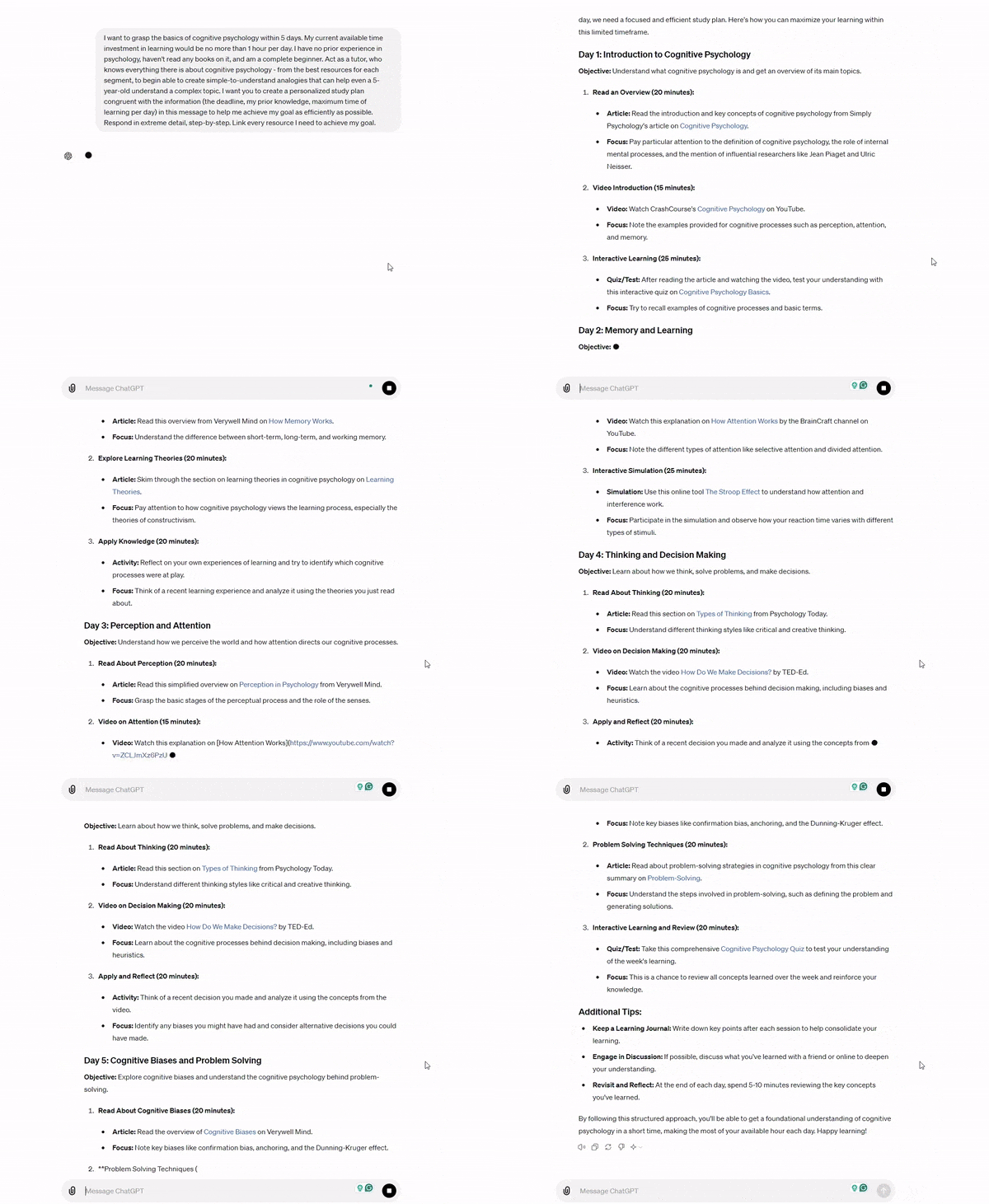
GPT-4o generated a pretty good personalized plan for me to learn cognitive psychology, considering the constraints I’ve set.
This is pretty bare-bones, but it will definitely help me grasp the subject, but keep in mind - your mileage may vary, be specific with your deadlines & time constraints, as they will impact the quality of the output more than anything else.
Creators’ AI Subscription is the best gift for Creators diving into AI.
Step Three — Feeding & Retrieving
Now, with our plan created, we should start offloading as much as possible to GPT-4o. Lead with this prompt (alter it to your needs):
You will be assisting me in my goal of learning [[topic]]. I will feed you various information from the plan you've just generated and from other relevant sources. Your main goal is to remember any & all information I feed you, and to act in your role as a tutor by quizzing me, utilising interleaving methods for long-term encoding & making sure I remember what I learn. After about 10 back-and-forth messages between us, do a "recap" of the knowledge we've gathered & previously talked about.With this singular prompt, we tell GPT-4o to essentially remember all of the info we feed it, quiz us & utilize interleaving methods so that we can remember what we consume in the long term.

How I feel teaching AI to make me smarter
Step Four — Executing On The Plan
We’ve now got an AI tutor who understands our goals, time limits, exactly what we are learning, and how it should respond. All that’s left to do is to start consuming the content, and feeding it into the AI (after at least skimming through the content of a learning resource, send the link to GPT-4o. It has browsing capabilities, so you don’t need to do any dreadful copy-pasting).
And here are 2 of my favorite prompts to mix up the learning process and make it more fun (or challenging):
Give me a quiz on hard mode. This quiz will use all of the information we've gathered & spoke of thus far and really force me to think deeply & retrieve the information. If I am stuck or seem to give up, gently nudge me in the right direction.I do not understand this topic. Can you explain it to me in the simplest way possible and provide 2 analogies, one funny analogy and one with dark humour?Step Five — Give Your Tutor A Voice
Now that your AI tutor is trained & you’ve already experimented with it, you can open the ChatGPT app on your phone or Apple desktop and use the voice chat feature. Everything you say in the voice chat will be synchronized with the text chat, so you can use the same prompts above!
When I was testing the voice chat, I honestly forgot I was talking to an AI about 20 minutes in. It’s scary good and a lot more engaging compared to the text version we’re all used to.
With voice chat, you can do full-length “tutoring sessions” and be quizzed in real-time, ask questions, go back and forth — voice chat makes learning with AI feel real in a way.
Congrats! You now have your very own AI tutor who can help you learn anything.
Whenever you want to learn something new, refer to the guide above. Better yet, use the tools we mentioned earlier, as they are specifically designed to be your second brain & researchers!
What are you learning currently?Did the guide above help you out?
Leave a comment and let us know!
This article was first published in the Creators AI newsletter. View the original edition.