How To Make Complex Tasks with AI Agents
AI Agent Implementation Rules
Hi there!
We’ve already published quite a few posts about AI agents, even though they only really started gaining traction the previous year.
Working with agents happens on a completely different level than chatting with a regular LLM model.
That’s why in this piece, we’ll break down:
- What you actually need to know about AI agents
- The rules that make them work (efficiently)
- And which agents you can use today (and what they’re best suited for)
Let’s go!
Keep your mailbox updated with practical knowledge & key news from the AI industry!
From Tools to Agents
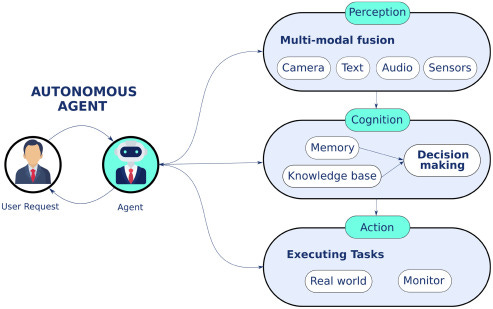
As we’ve already discussed, early AI tools had neither memory nor initiative. We were fully in control of every step of the process. The system did nothing unless something was instructed.
Later, with the rise of copilots, AI started to operate inside the workflow. We gained session-level context, reactive suggestions, and lightweight assistance, but there was still no real sense of intent or end goals. We’ve reviewed many of them before, and each is strong within its own niche: Notion AI, n8n, Zapier AI.
Today, however, the real challenge is the ability to act over time consistently and autonomously. And this looks like a job for AI agents. So far, AI agents can be defined as software systems designed to plan and execute tasks autonomously, make decisions, and interact with digital tools or environments with minimal human oversight (I’m sure that as agents develop, the definition will change).
This is why solving complex tasks has become the primary goal of agent development. Here is where things get interesting.
What is a Complex Task
Complexity emerges when a task requires sustained reasoning, adaptation, and coordination over time. I’d say the kind of processes professionals deal with daily.
Below are the characteristics that turn a simple task into a complex one for an AI agent.
- Time framework
A task becomes compound when it operates over an extended period. Instead of producing a result in one session, the agent must track progress and remember prior decisions across days, weeks, and even months.
- Multi-step dependencies
Later steps often depend on the successful outcome of earlier ones. An agent must plan and avoid taking actions that block future steps.
- Tool and Environment switching
Many real-world tasks require an agent to operate across multiple tools, systems, or environments: databases, APIs, documents, browsers, internal dashboards, and code editors.
- Need for self-correction
You know that errors are inevitable. What matters is whether the agent can notice that something went wrong and recover.
- Partial observability
The agent never has access to the complete state of the task or environment at once. Due to this, information may be missing, delayed, hidden behind tools, or only revealed after certain actions are taken.
🧩 So basically, the core of any AI agent is based on three things:
Planning – figuring out goals and breaking them down
Action – actually doing stuff in the world (API calls, code, GUI clicks, whatever)
Critic – checking itself, spotting mistakes, and learning.
What we’re about to go through are pretty technical cases. They were originally written for devs, but the point is that you can totally use these rules for Vibe Coding too. It’s how you set up an agent so it gets exactly what you mean.
Scaling Long-Running Autonomous Coding
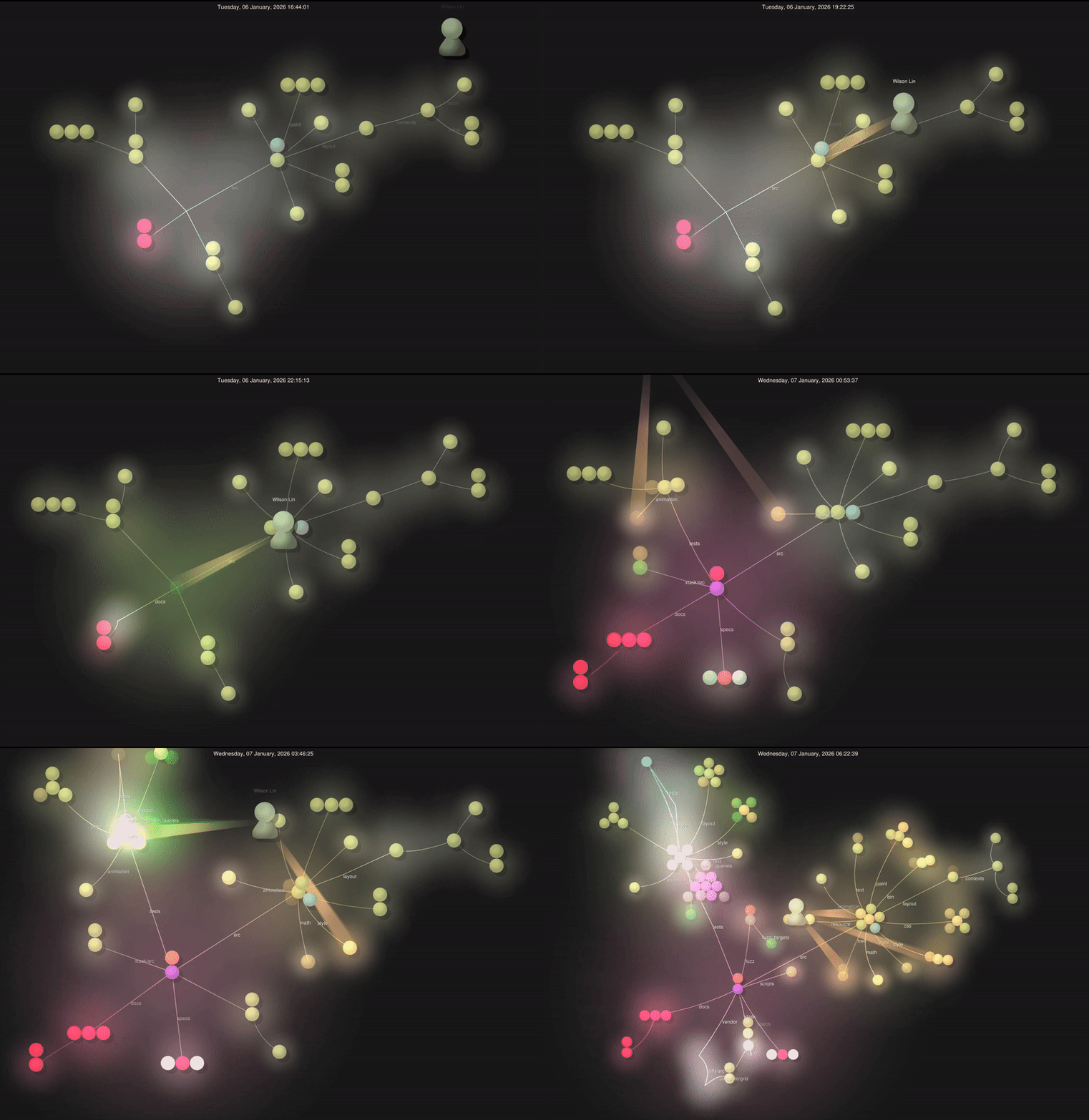
The process of Cursor building a 3M+ line browser in a week
Cursor published an account of its experiments with running autonomous coding agents for extended periods. The goal was to test whether agent-based systems could handle projects that normally take human teams months to complete.
The experiments focused on three questions:
- Can autonomous agents work productively for weeks?
- How should multiple agents be coordinated on a single large codebase?
- What breaks when scaling agentic coding systems?
Experiment Setup
Cursor ran hundreds of concurrent agents on a single project and deployed trillions of tokens with over one million lines of code. The system was designed to observe agents’ behavior in coordination, drift, failure modes, and recovery.
Step 1 – Testing the limits of a single agent
The team noticed that while a single agent performs well on well-scoped tasks, it becomes inefficient for large projects. In a nutshell, the progress is slow, context management degrades, and the agent struggles to reason across many interconnected components.
This led to the natural next step: parallelization.
Step 2 – Flat multi-agent coordination (it didn’t work, tho)
The first multi-agent design treated all agents as equals. Coordination was handled through a shared file where agents:
- Checked what others were working on
- Claimed tasks
- Updated their status
To prevent conflicts, the team implemented locking mechanisms.
What failed:
- Agents held locks too long, or even just failed to release them
- Lock contention severely reduced throughput
- In the end, everything went awry: agents failed mid-task, reacquired locks incorrectly, or bypassed locks entirely
The team then tried optimistic concurrency control and allowed free reads.
But with no hierarchy or ownership:
- Agents avoided difficult tasks
- Work skewed toward small, safe changes
- No agent took responsibility for the end-to-end implementation
The result was churn without progress.
Step 3 – Introducing planners and workers
To address these issues, the team introduced new roles:
Planners
- Continuously explored the codebase
- Created and refined tasks
- Spawned sub-planners for specific areas
- Made planning itself parallel and recursive
Workers
- Picked up assigned tasks
- Focused only on execution
- Did not coordinate with other workers
- Pushed changes once tasks were complete
(And this worked out!)
At the end of each cycle, a judge agent evaluated whether to continue before restarting the loop.
Step 4 – Long-running experiments
Finally, using this architecture, the devs made Cursor run several large-scale experiments.
Building a Web Browser from Scratch

They even showed a video of the agent struggling. Building a browser from the ground up is very hard.
The agents ran for nearly a week, producing over one million lines of code across 1,000 files.
What mattered here was behavior:
- New agents could understand the existing codebase and contribute
- The system avoided collapse despite constant parallel writes and ongoing changes
Key takeaway: With clear role separation and fresh planning cycles, agents can make forward progress on large codebases without shared global context.
In-Place Solid -> React Migration
Another experiment focused on long-horizon refactoring.
The agents performed an in-place migration from Solid to React in the Cursor codebase. The process spanned more than three weeks, with 266,000 edits made and 193,000 reverted.
Key takeaway: Agents can handle large refactors when progress is continuously re-evaluated, BUT a user must still oversee at the end.
Product Performance Improvements
In a third experiment, a long-running agent focused on improving an upcoming product feature.
The agent rewrote video rendering in Rust and achieved a 25x performance improvement. It also added smooth zooming and panning, spring-based transitions, and motion blur that followed the cursor. This code was merged and prepared for production.
Key takeaway: Given a clear goal, agents can deliver greater improvements that combine performance and user-facing behavior.
Key insights from the experiments
Model choice matters!
GPT-5.2 models performed significantly better at:
- Sustained focus
- Instruction following
- Avoiding drift
- Completing tasks fully
The team noticed that Opus 4.5 (which was billed as the best coding model in the world, by the way) tends to stop earlier and take shortcuts when convenient, yielding back control quickly instead of finishing tasks.
And it's not just them, I checked Reddit and found people discussing how newer Opus 4.5 versions seem worse than older ones!
The team also found that different models master different roles, using planners and workers with different model assignments.
Simpler systems scale better
The final system was simpler than expected.Workers handled conflicts effectively on their own.
Prompting is a core system component (nothing surprising)
Many improvements came not from infrastructure changes, but from classic prompt design:
- It prevented pathological behaviors
- Encouraged ownership
- Maintained long-term focus
In practice, prompts mattered more than the orchestration framework itself.
What remains unsolved
The team notes several open challenges:
- Planners should react dynamically when tasks are completed
- Some agents run far longer than necessary
- Periodic restarts are still needed to combat drift and tunnel vision
So, choosing the right model and designing effective prompts are way more important than complex infrastructure, as they drive task completion and proper behavior. Simpler systems with well-assigned roles often outperform over-engineered setups.
The team shared the implementation details if you want to go deeper: click
Designing a Travel Concierge with long-term memory using OpenAI Agents SDK
If the previous case was about setting up the agent, this case aims to show that multi-step tasks are only possible when an AI agent can use memory correctly:
- preserve intent across long interactions
- distinguish between defaults and exceptions
- survive context trimming without losing critical constraints
- and make decisions that feel consistent over time
The developer chose to build a travel concierge because travel planning forces the agent to juggle preferences, constraints, history, and situational overrides, all while making irreversible decisions like bookings. In short, a very large number of actions at a time.
The practical part
The major design choice was state-based memory instead of retrieval. The agent reasoned over a persistent state object that evolved.
- The memory setup
The author starts each session with a structured user profile and curated memory
What this means:
Before the conversation, he provides a snapshot of who he is and what is already known about him.
This information is not conversation history. It’s like a file with rules.
There are two types of information:
- Structured profile – stable facts (loyalty status, home city, tone preference)
- Memory notes – human-style preferences (prefers aisle seats)
The dev gives us the prompt that he used to figure out what should go in working memory for any task:
You are a [USE CASE] agent whose goal is [GOAL].
What information would be important to keep in working memory during a single session?
List both fixed attributes (always needed) and inferred attributes (derived from user behavior or context).- New durable preferences
For example, a user says:
“Remember that I’m a vegetarian.”
This is long-term information that affects many decisions.
What the guy did:
- allowed memory writes only for explicit statements.
- stored the preference first in session memory.
- promoted it to global memory only after consolidation.
But not everything we say should be remembered. The agent only captures information when you use prompts like:
Save a memory ONLY if it is:
- Explicitly stated

- Likely to remain true across trips

- Actionable for future decisions

Do NOT save inferred or speculative preferences.
For example:
- “I’m a vegetarian” is durable
- “I want a window seat this time” is temporary
So, pay attention to your prompts.
Always use: usually / this time / from now on
If the conversation is too long, we may clarify things, change conditions, or return to earlier topics.
If conversation context is trimmed: re-inject the session memory into the system prompt. Do NOT rely on prior dialogue turns for critical constraints — always pull the rules and key facts from memory, not from what happened earlier in the chat.Overall, this is how it helps when working with memory:
- Preferences persist across sessions
- The agent stops re-asking the same questions and starts acting predictably
- There’s no speculative inference, because clear rules define what should be remembered and what should be forgotten
- We design the memory layers ourselves:
+ Latest user message – what we want right now + Session-level context – preferences specific to this trip (in this case) + Global memory – what the user generally prefers
- The memory lifecycle is explicit: capture > filter > reuse
Without strict rules for consolidating memory, you can get duplicated memories and old preferences sticking around
In the original cookbook example, the author builds the travel concierge agent using code in the OpenAI Agents SDK. So, if you want a fully functional agent like in the tutorial, you need to write some code.
However, the conceptual rules and best practices demonstrated in both examples apply to all AI agents, not just code-based ones.
Choosing the Right AI Agent Platform
Now that we’ve covered the rules that help you work effectively with AI agents, let’s look at which agents are popular today and how they can actually help you.
We’ve already covered Cursor (you can build semi-auto agents in the UI, and full agents through the CLI), Claude Code, and Claude Cowork enough in previous articles, so I suggest concentrating on the others.
OpenAI Atlas
You can build agents directly inside the browser. Probably, this agent has the easiest learning curve among all of them.
Why this matters
- There is an already embedded agent builder
- You just need to ask to create a specific agent, using a prompt
- Almost the whole process is automated
Check it out, a guy created an AI agent that generates personalized emails: Click
Best for:
- Work with webpage UI elements (search bars, menus, forms)
- Autofilling email templates from page data
- Researching and compiling briefs
- tracking price or product info across sites
Autonomy
Agents can perform multi-step tasks in the browser, but, frankly speaking, it constantly requires oversight. Atlas pauses on sensitive sites (finance), cannot run code, download files, or access the file system. So, not fully autonomous yet.
Models
Of course, it integrates ChatGPT models.
Cost
Free for basic use, but full Agent Mode is available in ChatGPT Plus ($20/mo), Pro ($200/mo), Business ($25–30/mo), and Enterprise. API usage is separate.
LangGraph
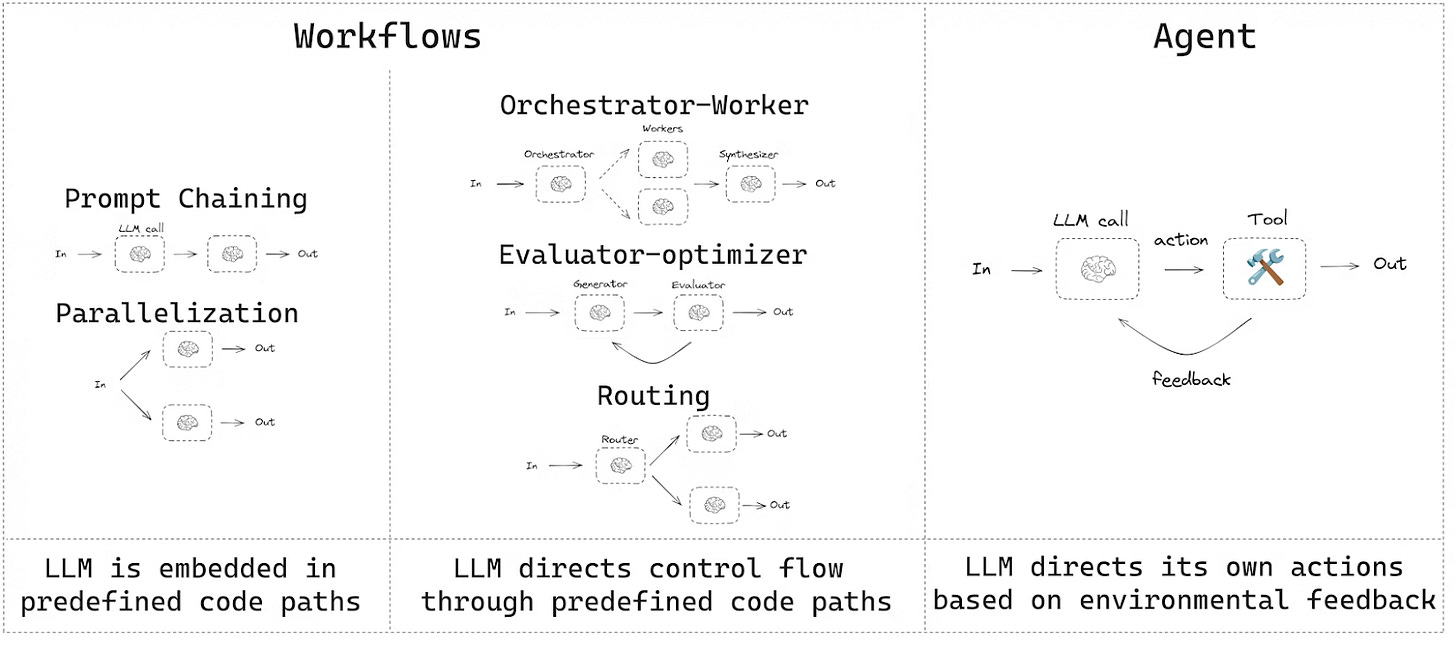
It’s a framework where agents are modeled as explicit state machines with graph-based execution.
To see more ways to use LangGraph in your workflow, take a look at these articles: Click
Why this matters
- Due to the explicit state, it produces fewer hallucinations
- Cycles and checkpoints lead to long-running tasks
- Full transparency
Best for:
- Memory-heavy agents (projects where agents need to track lots of state over time, such as marketing KPIs, lead generation, and content creation)
- Human-in-the-loop workflows (AI-assisted project management)
- Production and enterprise use cases (enterprise software automation, internal tools, business workflows)
Autonomy
It’s great for long-running tasks. Suitable for scenarios where an agent needs to work for hours or days without losing context and can resume work after pauses.
Models
Supports any LLM (OpenAI, Anthropic, etc.)
Cost
It’s open-source (MIT license)! You pay only for the LLM API and infrastructure. Observability with LangSmith from $39/mo.
Workspace Studio (Google)
A no-code platform where you can build agents and workflows visually, letting them act together like a coordinated team.
Why this matters
- Intuitive drag-and-drop interface, easy to see how agents interact
- Quick to prototype and launch workflows
- Can handle surprisingly complex multi-step processes
Best for
- Automating office and business workflows
- Content creation and document processing
- Research and data gathering
- Marketing tasks and campaign management
Autonomy
In general, the level of autonomy depends on the workflow, but it is mostly medium.
Models
Gemini models (integrated with Google Cloud).
Cost
Included in Google Workspace Business/Enterprise ($6-18/mo).
AutoGen
It is a research-driven framework from Microsoft built around event-driven agents.
Why it matters
- Agents run independently and react to events, so parallel work is scalable
- They also coordinate through structured dialogue, so it’s easier to manage complex workflows
- works well on research tasks that require multi-agent coordination
Best for
- Research and experimentation
- Prototyping complex systems
- Educational and evaluation setups
However, in this case, the development requires coding to configure events and logic.
Autonomy
High in multi-agent scenarios. Agents are usually independent, react to events, run in parallel, and can interact in group chats.
Models
Any LLM (GPT, Claude, Gemini, Llama 3.1, community)
Cost
Also open-source, you pay only for the LLM API.
Key Rules for Working with AI Agents
- Design memory deliberately
- Distinguish durable vs temporary memory
- Forgetting is mandatory to avoid drift
- Define roles and responsibilities
- Planners vs workers, or specialized sub-agents
- Clear lifecycles for memory and tasks
- Write a clear prompt that sets the task
- Model time explicitly
- Track progress over sessions
- Use time awareness to avoid conflicting signals
- Set clear “done” criteria
- One workflow, one success metric at a time period
- Scale only after it works reliably
# The bottom line
Agents can mean different things, but the key distinction is how autonomous the system is. They decide their own actions, plan, and interact with tools or environments over time
Agents will inevitably enter our routine, because well-structured agents can tackle complex tasks that simple workflows cannot. But you should always be on the guard, because as you’ve noticed, they are still not perfect and can delete or transform documents, or even take unexpected actions that fall outside your intended workflow.
This article was first published in the Creators AI newsletter. View the original edition.