Build Your AI Email Newsletter System
With tips from creators with 10k+ followers
Hello friends!
Many of you already create content, or have been thinking about starting. No matter your field, you already have knowledge worth sharing.
Content creation can feel time-consuming and messy, unless you offload part of the process. Nowadays, creators are using AI agents to research topics, structure ideas, plan content calendars, and support publishing without being involved in every single step.
That’s why we want to share*practical tips* from creators on how they use AI to build content more efficiently — the approaches we use ourselves.
In this article, we’ll explore
- How creators build their autonomous systems
- Discover what else you can do with AI in Email Marketing
Keep your mailbox updated with practical knowledge & key news from the AI industry!
Luan Doan Set Up MCP to Schedule Substack and It’s Not That Hard
Most people quit blogging because it’s manual and repetitive (I get why this happens).
You’re supposed to remember what to post, when to post, and somehow still have the energy to do it consistently.
In the previous newsletter, we talked about optimising Claude Code and pushing it to work harder for you. In this case, we’ll see that even Claude Chat can do a lot more than people think and solve this problem.
What’s the idea?
The author built an automated Substack Notes publishing agent using Notion, Claude Desktop + MCP, and Windows Task Scheduler.
It’s a self-running content system that simplifies the setup, allowing your publishing workflow to run automatically and reliably over time. Your AI connects directly to all your tools, databases, and systems.
You just need to dedicate your time to writing!
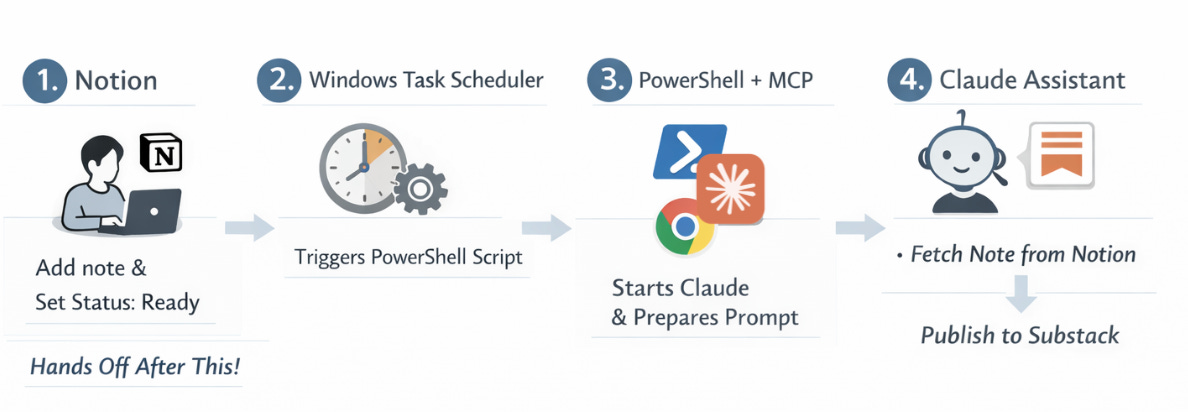
🛠 The full workflow
- You’re the main character in the beginning
- Open Notion
- Add an idea or a finished note
- Set Status = Ready
But after that, no more decisions.
- The scheduler is in charge of time
Here, Windows Task Scheduler (or you can use an open-source Task Till Dawn for macOS) runs at fixed times. At each slot, it triggers a PowerShell script.
- PowerShell glues everything together
This cross-platform tool serves to start the AI and hand it instructions:
- launches Claude Desktop
- opens a new chat
- pastes a pre-written prompt file
- hits Ctrl + Enter
- switches to the browser
That’s it.
- When Claude embarks on
Claude reads the prompt:
“Help me publish one Substack Note from Notion…”
Then Claude follows the list of duties:
- reads entries from Notion
- filters by Status = Ready
- picks the first one
- publishes it to Substack
- updates the status to Posted
No Ready notes? Nothing happens.
Why this matters
The setup might look technical at first, but it works. Take your time to analyze every word in this case, because:
- Publishing becomes a background process
- Content goes out even when you’re busy
- It’s a kind of clean content pipeline
Like everything else in this article, this is built for solo entrepreneurs, freelancers, consultants, and AI enthusiasts.
How a French Creator Automated His AI Newsletter
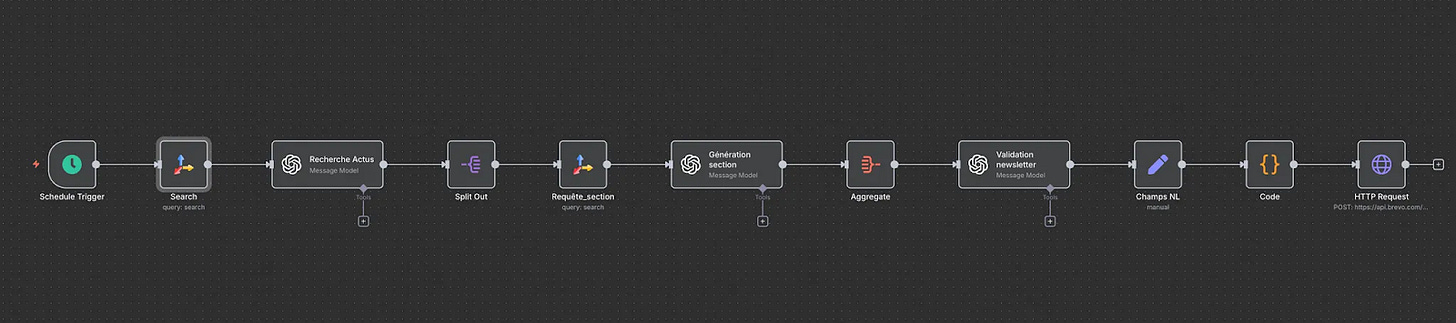
This workflow tackles the same problem, just with a different toolset.
The original case is in French, created by Louis Graffeuil, but it’s absolutely worth the read. If you want to go deeper, you know that AI can always handle a clean translation for you.
What’s the idea?
All the logic is inside n8n and built around four layers:
trigger > content > quality control > delivery
The cool thing about this workflow is that it takes care of all the tedious stuff, such as monitoring news sources, filtering for what’s actually relevant, then laying out and sending the email.
The exact same system can run 5-10 different newsletters. You just swap the prompts and the sources.
🛠 The full workflow
- n8n schedule the start
For example, every Monday morning. After this, the workflow kicks off automatically.
- News discovery (Tavily)
This tool works as a search engine designed specifically for AI workflows. Tavily searches for articles, news, sources, and images.
What you get: raw material (URLs, excerpts, visuals)
- First-pass filtering (OpenAI)
Our old friend:
- analyzes Tavily’s results
- keeps only relevant items
- removes duplicates and weak sources
What you get: a clean shortlist of the week’s key topics.
- Split Out in n8n
This creates a prepared editorial backbone. Content is divided into 2-3 logical sections, for example:
- Main story
- Key updates
- Emerging trends
- Deep research per section
Here, Tavily is called again, but this time on a topic:
- full article text
- supporting images
Now, you’re working with depth summaries.
- Writing the newsletter (OpenAI)
OpenAI turns these raw inputs into email-ready text. So, it takes into account:
- tone
- audience
- newsletter voice
- Aggregation
Its focus is on merging all sections into a single draft.
- Final validation (OpenAI)
It puts the draft up for review:
- logical flow
- transitions
- headline quality
- formatting
OpenAI generates: a refined title and improved structure
- YOU step back in here
Some manual steps can’t be avoided. You should:
- add your point of view
- sharpen the CTA
- align the issue with current business goals
> This is the moment that separates a strong newsletter.
- Formatting & sending
- The system creates an HTML template and uploads the email to Brevo (Brevo can be switched to Beehiiv or Substack, or any other Newsletter Platform)
- Sent only after your final check
Why this matters
Obviously, AI doesn’t replace the creator, but it replaces the grunt work. It filters out the noise, adapts content for your audience, and matches the style you need.
We remain the editors and carriers of meaning.
Now let’s move on to deeper examples.
AI System to Automate Entire Marketing by Wyndo
Let’s Talk Marketing.
While we’re building a personal brand, we lose the most valuable things in the process: time and mental energy.
What’s the idea?
This system takes any piece of content and automatically repackages it into multiple formats.
Here, the author automated marketing operations, leaving us with just three things:
- thinking
- expertise
- decision-making
Everything else runs in the background.
🛠 The full workflow
- Intelligent Ideation
In this section, AI agents constantly scan multiple sources: Reddit, YouTube, TikTok, and newsletters.
This is executed by automated scripts via Make/Zapier.
> We already talked about these tools in the article about Notion. Check it out!
Each agent filters sources through its perspective (voice, positioning, and domain expertise encoded into the AI)
Every morning, we can get an AI briefing with ideas that fit us specifically.
- Research
AI expands on selected ideas by Claude + supporting agents, focusing on:
- audience interests
- its own experiments
- complex or controversial angles
- Content Creation
Here, we continue with Claude or Claude Code, which were trained on our previous work.
The AI generates drafts based on:
- past high-performing posts
- your established tone of voice
- proven long-form structures
- Repurposing
Once a newsletter goes out, the system automatically turns it into:
- LinkedIn posts
- Substack Notes
- X (Twitter) threads
- other platforms.
Powered by: Firecrawl agents or Make / Zapier workflows
AI recomposes the content for each platform’s native style.
Why this matters
And if you go deeper into Wyndo’s system, you’ll find that he also automated visual content briefs and analytics tracking. Plus, there’s the audio and video side with NotebookLM + ElevenLabs to turn text into audio podcasts.
To sum up, I can say that keeping up with consistent, high-quality content takes serious time. But this workflow surfaces only the ideas we need and produces multi-format content without manual rewrites.
Ready for the last one?
A Fully-Automated Newsletter with AI
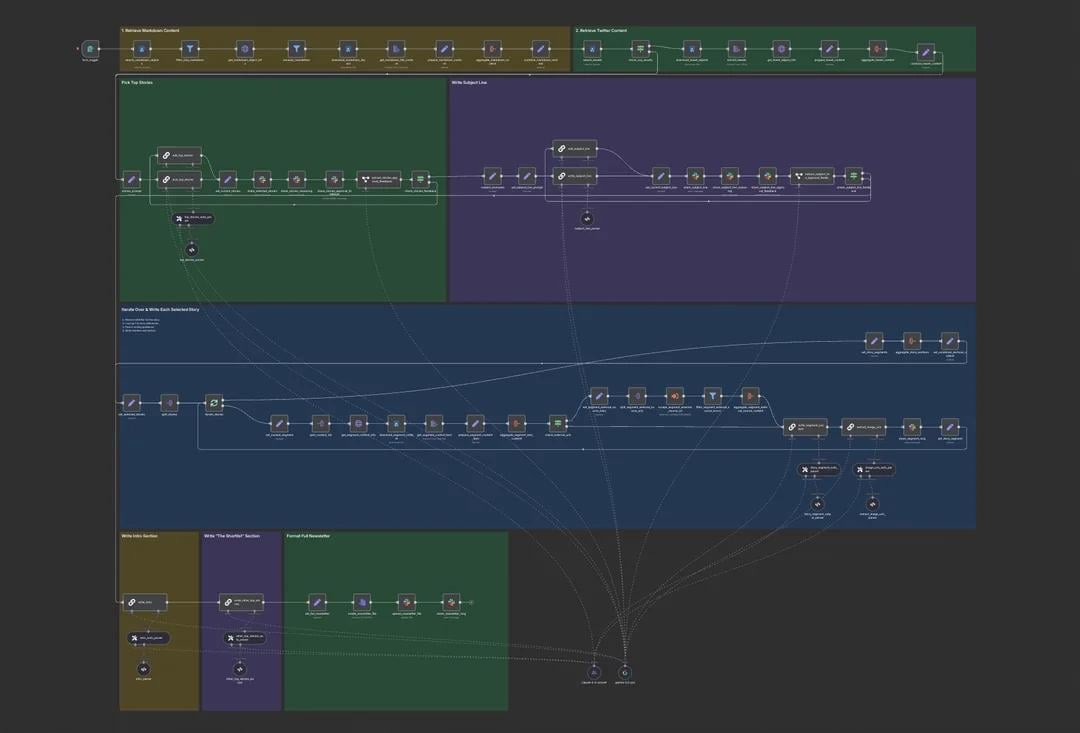
A crazy scientist system, right? 😄
This case comes from David Roberts, a builder who turned a side project into a fully automated AI newsletter with thousands of subscribers.
And this one is for those who don’t have time at all.
What’s the idea?
Instead of automating writing:
- Each day, the system sources AI news stories
- Then, it saves the stories in a data lake as a markdown file
- And after all, AI filters, edits, and writes those through this n8n workflow to generate a final newsletter
Our (I mean, humans’) input is reduced to approvals and directional feedback.
As you read through, you might notice that this case is similar to the second one in terms of architecture, but they operate at different levels of automation and human involvement.
In this case, the system removes the human from execution, while in the second, AI acts more like a senior assistant to the human editor.
🛠 The Full Workflow
There are two main systems:
- Data ingestion consists of collecting and structuring news
- Newsletter generation is about selecting stories and writing the issue
Everything runs inside n8n.
Workflow 1: Data Ingestion (the foundation)
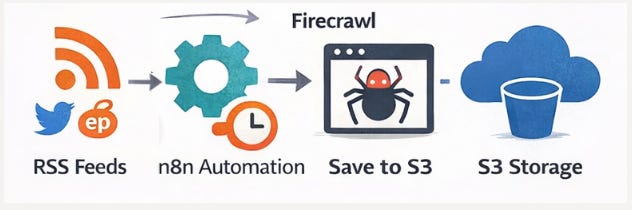
This aims to provide full control over sources + prompt-ready content.
What you set up :
- RSS (how RSS works explained here – Click) feeds via RSS.app for Twitter, Reddit, AI blogs, etc.
- A scheduled n8n workflow (runs every few hours and pulls new URLs)
- An S3 (Simple Storage Service) bucket to store scraped content.
What the system does:
- pulls fresh URLs from each RSS feed via HTTP
- sends each URL to a Firecrawl
- extracts content as markdown (not raw HTML)
- stores each story in S3, organised by date
We should end up with ~100 AI-related stories per day that are ready to prompt against.
Workflow 2: Newsletter Generator
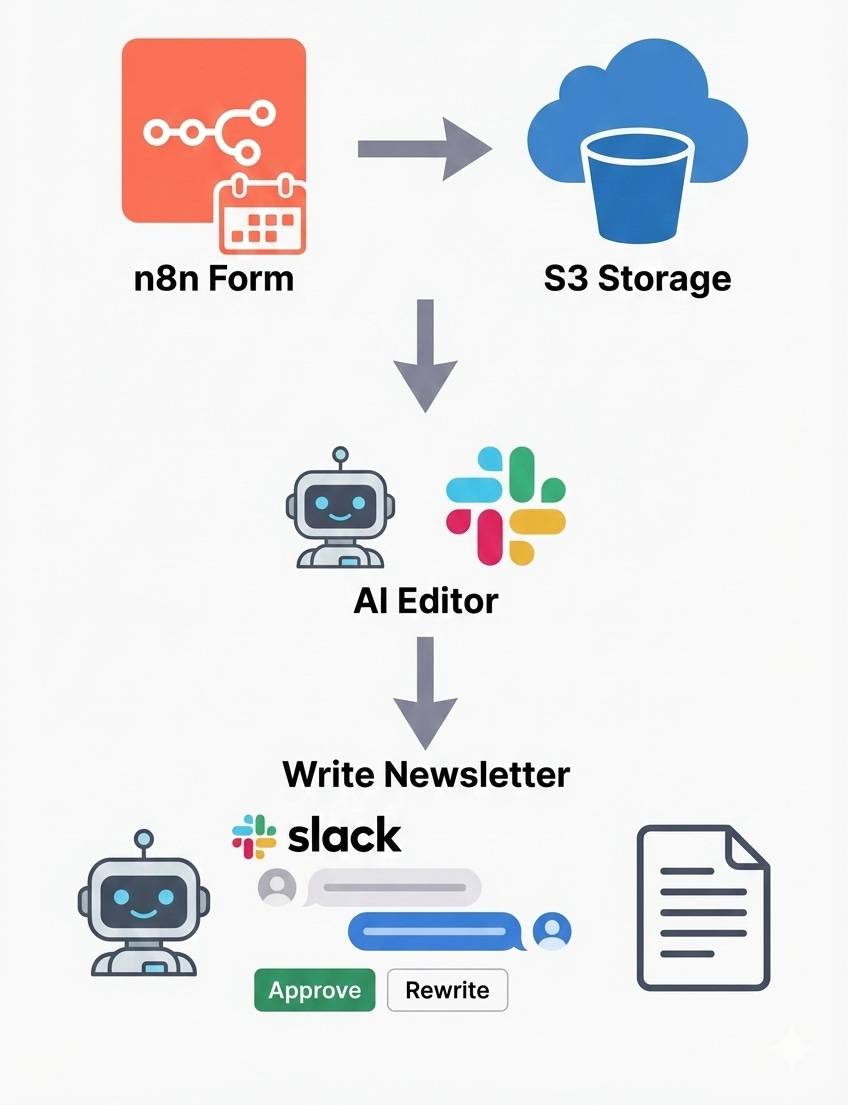
Here we set how the newsletter should be written.
- Trigger & Inputs Creation
What you do:
- open an n8n form
- select the date you want to generate the newsletter for
- optionally paste yesterday’s issue (to avoid repeats)
What the AI does: starts the workflow using those inputs
- Then, the system loads stories from the data lake
- pulls all files from S3 for the selected date
- filters out everything except .md files
- loads and formats the text for prompt input
> You don’t touch the data at this stage.
- AI Editor comes in
What the system does:
- runs a dedicated “AI Editor” prompt
- reviews all available stories
- selects the top 3-4 most relevant for the audience
You connect it via Slack and receive selected stories that are posted to Slack. Then, you either approve them or leave feedback
If needed, the AI reruns the selection using your input.
You guide the final decision.
- Subject line selection and writing the core newsletter sections
- AI proposes one main subject line + alternatives and sends to Slack
- You approve via simple feedback
Eventually, stories are handled one by one by the system, not in a single giant prompt.
- It loads only the relevant markdown files for each story
- keeps context tightly scoped to reduce token waste
- writes each core section individually
- After your edits, format the full issue as a markdown
Why this matters
As you’ve probably noticed, his setup is nearly fully automated. Here, the AI does almost everything: it selects the news, decides what’s important, writes the main content, and assembles the entire newsletter.
You might have mixed feelings, but there’s still a lot to learn from the system itself. Like this, you could publish smaller automated updates or micro-newsletters, saving time while keeping your audience engaged.
The goal is to work smarter and save time for better writing!
What We Learned
Use RSS as raw material
RSS.app + 20 sources = around 100 articles a day!
Store content in markdown
Markdown is prompt-ready by default. In addition, it gives you a predictable context.
Train AI on your past work
We stick to this approach: drop in 15-20 of your best posts so the AI can learn your voice.
Separate thinking from execution
Let AI handle operations, collect, filter, and draft. Your task is to figure out how to sharpen the angle and add judgment.
If AI starts thinking for you without your ideas as the foundation, the system is broken.
Build content in blocks, not one massive prompt
One prompt = one logical unit. To ensure fewer hallucinations, try to use one prompt per section.
How else AI Can Help With Growing & Scaling Your Email List
Beyond everything you’ve just discovered (which is already a lot), it’s worth remembering one key thing: AI shows up across the entire email workflow.
Once the system is set up, AI can still help you (I also added tools to make it easy for you to begin):
- building a realistic content plan (LLMs, Notion, Airtable, CRM data)
- personalising messages at scale (LLMs, HubSpot, Customer.io, Brevo)
- anticipating subscriber behaviour (campaign data, GA4, Mixpanel, LLMs for analysis)
- automating routine tasks
- running A/B tests (Beehiiv, ConvertKit + AI analysis)
- choosing the right moment to hit send (here, just ask to assess behavioural data)
- improving deliverability (Mailgun or SendGrid + AI analysis)
- and shaping a complete, end-to-end email strategy (also very simple, AI-assisted insights + our judgment)
The bottom line
Even if you’re not planning to start a blog, all of this still applies. The same setups can power your personal social posts, client newsletters, or pretty much any content you decide to put out.
Because now you’ve seen what these tools can actually deliver in practice.
Tell us about your automation tricks!
This article was first published in the Creators AI newsletter. View the original edition.