
MCP for Creators: Engineering Content, Research & Sales
MCP Servers for Creators Routines without coding
Five servers, four use cases, and the one I built myself
Hey!
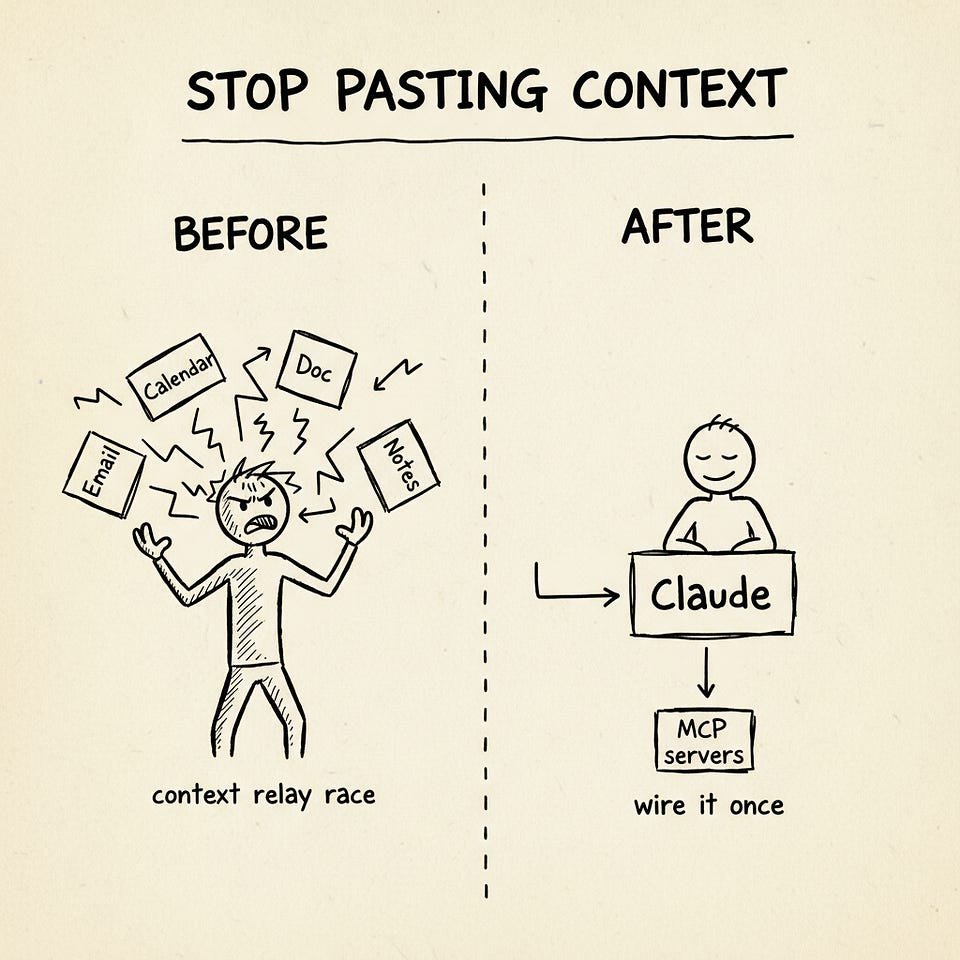
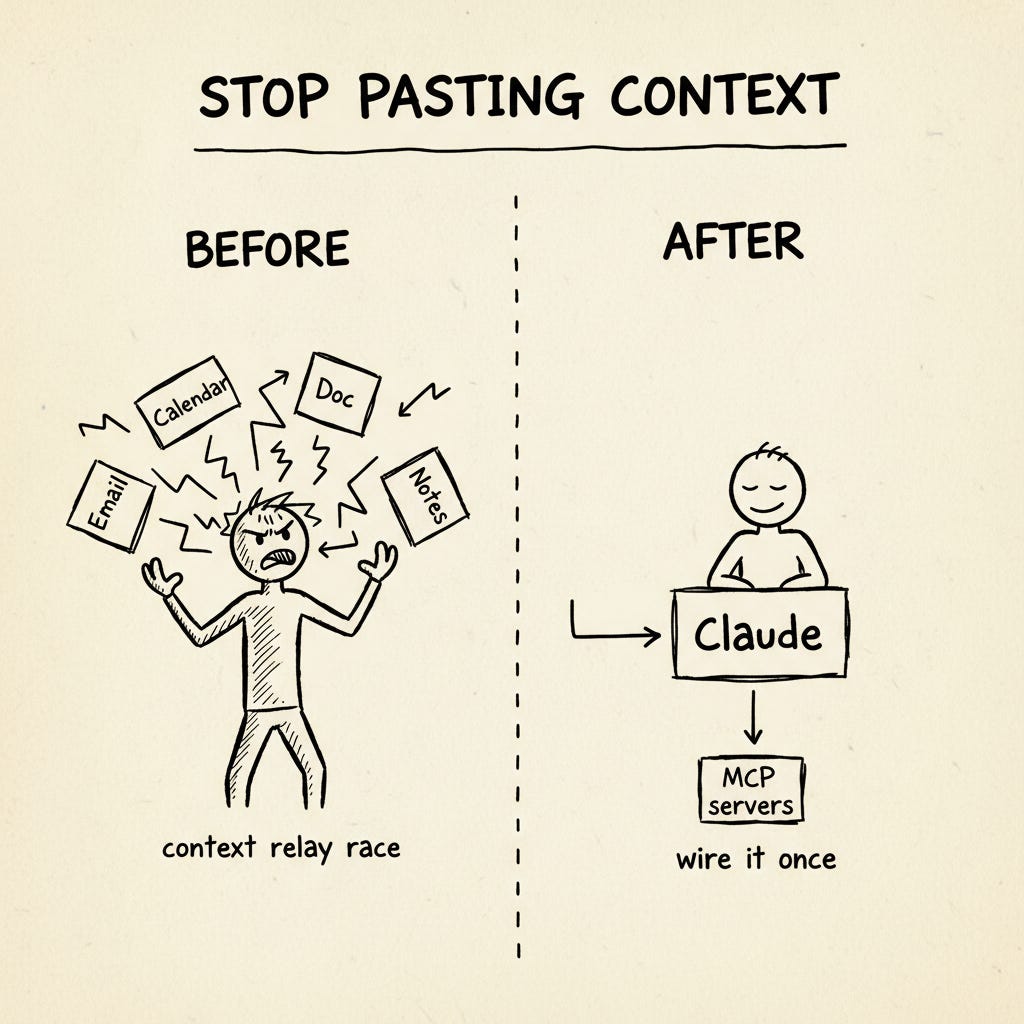
Most Claude workflows in 2026 still look like a context relay race. You paste an email, prompt, paste a transcript, prompt again, paste your calendar, prompt one more time. The work is fine. The plumbing is the problem.
MCP is the boring fix nobody wants to write about. Boring, because there’s no demo moment that makes a screenshot pop. Underrated, because it quietly replaces 80% of the copy-paste that fills your day.
This post walks four use cases I actually run — two for posts, two for leads — plus a worked tutorial on the custom MCP server we built ourselves. By the end you should have one workflow off the relay race in about ten minutes.
Here’s what we’ll cover:
- MCP in 90 seconds 🧠
- Five servers that change your day ⚙️
- Four use cases 🛠️
- Setup in 10 minutes ⏱️
- What NOT to give MCP 🚫
Keep your mailbox updated with practical knowledge & key news from the AI industry!
MCP in 90 Seconds 🧠
The plain analogy: MCP is USB-C for AI apps. Apps speak Claude’s language directly, instead of you being the middleman.
The technical version: it’s a small server that exposes your data and actions to AI in a standard way. Three things a server can do:
- Expose data — read your Gmail, your Notion, your CRM
- Expose actions — send an email, create a record, schedule a post
- Expose prompt presets — canned instructions you can trigger
The mental shift: you stop transferring context. You wire it once.
Why now? The protocol stabilized in late 2025, official servers shipped for Gmail, Google Workspace, Notion, Apollo, HubSpot, Attio, and a long tail of others across early 2026, and both Claude Desktop and Claude.ai speak MCP natively.
If you need the foundational walkthrough, our MCP full guide for founders and makers is the place to start. This post assumes you’ve read that or know the gist — and focuses on what to actually do with it.
Five Servers That Change Your Day ⚙️
Read these as menu items. The use cases below pull from this set.
1. Gmail
Claude searches your inbox by sender, thread, date, keyword.
Find all sponsor reply threads from the last month and tell me which deals stalledInstall the official Gmail MCP. Keep it read-only for the first week. If you want write access later, scope it to create drafts only — never auto-send. (I learned this the hard way. More on that in the trust section.)
2. Google Drive / Workspace
Claude pulls docs by title or content, opens spreadsheets, drafts in Docs.
Look at my last 3 newsletter drafts and outline next week’s in the same shape.Separate servers exist for Drive, Docs, and Sheets — install only what you actually use. Workspace is the easiest first connector because the safe scope is obvious.
3. Brave Search
Real-time web search inside Claude Desktop, via Brave’s official MCP server. Claude can search the live web, news, images, videos, and local results — without ever leaving the conversation.
The free tier covers 2,000 queries per month, which is more than enough for most creator workflows. Brave’s own setup guide walks you through it in under five minutes.
My honest take: if you only install one server from this list, install this one. Web search inside Claude Desktop changes everything you can ask Claude to do — research, fact-checking, current-events context, the lot.
For heavier scraping needs — JS-rendered pages, structured extraction, deep crawls — Firecrawl MCP via Claude Code is the better tool. Brave is for “find me what’s on the web right now”; Firecrawl is for “pull this specific page into structured data.” Different jobs.
4. Apollo
Search Apollo’s contact and company database — hiring leads, sales prospects, partnership targets, sponsor research.
Apollo launched its native Claude connector in February 2026 as a beta, with OAuth-based authentication and no API keys required. We’ll get into the actual receipts on this one in UC3.
5. HubSpot or Attio
CRM via MCP.
- HubSpot has the official Anthropic connector (launched July 2025)
- Attio is the lighter-weight alternative — AI-native, OAuth, generous free tier — and increasingly the default for solo creators who don’t want HubSpot’s footprint
- Notion-as-CRM also works via the Notion MCP (covered in our Notion AI automation guide)
The pattern is the same regardless of which one you pick.
Four Use Cases 🛠️
Research for a Post / Video
Before: Open Notion, search keyword, copy chunks. Open Drive, search again, copy more. Open browser, scrape three sources, paste into Claude. Ten to fifteen minutes per post before you’ve written a sentence.
After: One Claude conversation reads Notion (your archive), Drive (your drafts folder), and Brave Search (the live web) in a single query.
Claude, pull everything I wrote about [topic] in the last 90 days from Notion. Then use Brave Search to find what's new this week from these three sources. Give me the angle I haven't covered yet plus three hook options.Two minutes. Your archive stays current automatically — no monthly CSV refresh, no project re-upload. The win isn’t speed alone, it’s that the analysis reflects what you actually published yesterday, not last month’s snapshot.
This is the simplest workflow in the post, and the easiest one to act on today. The deeper pattern — Claude reading your archive instead of you re-explaining yourself every session — is the same pattern we’ve used in every system we’ve shipped at Creators’ AI:
- Our AI email newsletter system uses the same shape — Claude reads source material live, writes drafts to where you actually work
- The Firecrawl MCP setup (for Claude Code users who need heavier scraping) extends this pattern to the live web
- The broader stack — Skills for preferences, MCP for capabilities — is the framing I unpack in Skills, Plugins, Swarm Mode
Below the paywall, three use cases that go further: the custom MCP I built (and why), the March 2026 sponsor-search story where Apollo MCP replaced a four-hour overnight agent run, and the daily CRM-to-Gmail follow-up loop that’s quietly the highest-ROI workflow on this list.
Generate Content with MCPs (and Why You’ll Build Your Own MCP)
The pain: every Substack post, every social card, every ad needs a hero image. The default workflow is open Midjourney, prompt, download, upload to Substack, repeat. The output looks like Midjourney, not like you. Every image is a new prompt-engineering exercise and brand consistency is a function of how disciplined you are.
This breaks down into two layers — and they get different solutions.
Layer 1: Just Use an Off-the-Shelf Image MCP
If you don’t care deeply about brand consistency, install one of the existing image-generation MCPs. The cleanest current option is shinpr/mcp-image, which wraps Gemini’s Nano Banana 2 and Nano Banana Pro with prompt optimization and platform-size presets (Substack hero, Twitter card, LinkedIn header, etc.). One npm install, one API key, done.
This works. You’ll save the round-trip to Midjourney’s web UI. What you won’t get is a consistent visual language across every image.
Layer 2: Build Your Own — Because Off-the-Shelf Can’t Enforce Your Brand
We hit the brand-consistency ceiling fast at Creators’ AI. Every post needs a hand-drawn whiteboard-sketch aesthetic — black ink on cream paper, slightly imperfect, the visual equivalent of “explained at a cafe.” No off-the-shelf MCP knew how to lock that in. So we built our own.
The image you’re looking at right below this paragraph was generated by it.
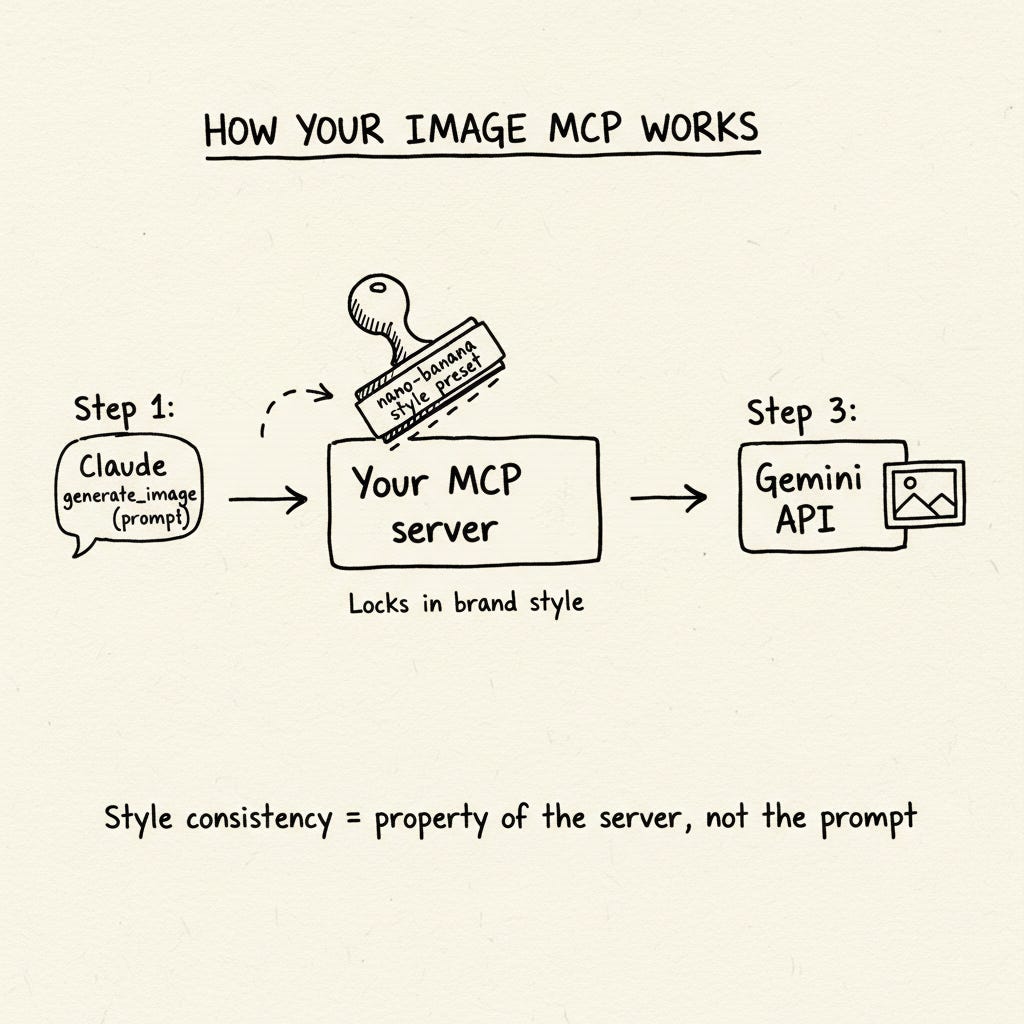
Here’s the architecture, no code dumps.
The stack:
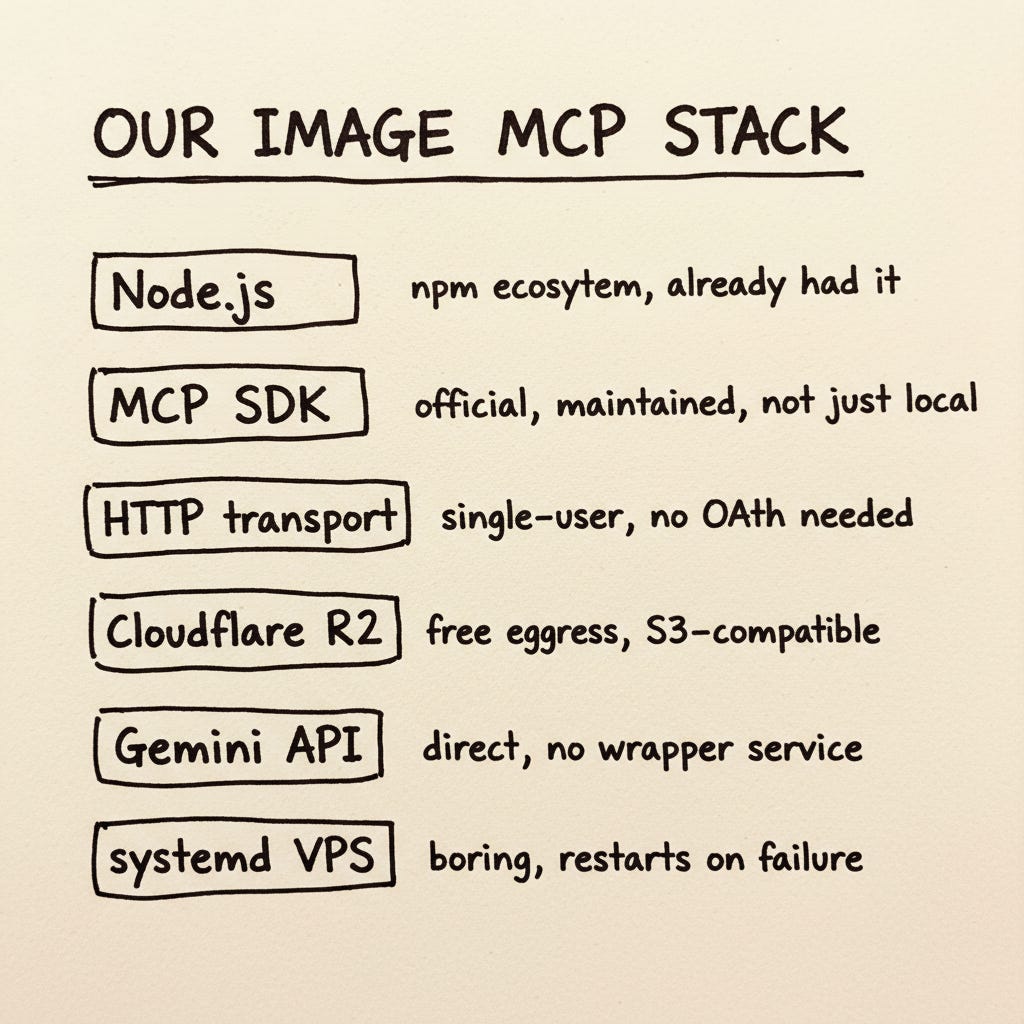
The four tools we exposed:
generate_image— prompt + style preset → Gemini → R2 → returns URLfetch_page_image— URL → grab og:image → re-host on our CDN → URLdownload_image— direct image URL → re-host → URLcheck_images— list what we generated on a given date
Every tool returns a CDN URL, never binary bytes into Claude’s context. That single design choice keeps token costs sane.
The style preset trick — this is the punchline.
We named one style nano-banana (yes, after Google’s image model — the joke is intentional). When Claude calls generate_image(prompt="MCP topology diagram", style="nano-banana"), the server prepends our locked style description to the user’s prompt before forwarding to Gemini. Hand-drawn sketch, black ink, cream paper, minimalist whiteboard doodle — the full brand stamp.
Claude doesn’t have to remember our visual brand. The MCP server enforces it. Style consistency becomes a property of the infrastructure, not a property of how carefully you prompt. That’s the whole bet.
Build vs buy:
- Build if (a) you need output consistency beyond what prompt engineering reliably gives you, (b) you want to integrate the MCP with your own pipeline, database, or scheduler, (c) you don’t want a third-party service in your data path
- Don’t build if you just need Gmail/Drive/Notion search — the official ones are excellent
- The middle case — a thin MCP wrapper around an API you already use — is often under 300 lines
Jenny Ouyang published a complementary piece in April: How to Build an MCP Server in 2026: 5 Patterns I Actually Shipped. She built Substack newsletter MCP, Substack notes MCP, Substack article MCP, Gmail MCP, a crossposting MCP, and a paid-subscribers-only MCP. “None of them were the same kind of server, because none of them had the same requirements” — same lesson we landed on. Different jobs, different shapes.
If you want to go deeper on the agent-and-skill side of the same stack, see our Skills, Plugins, Swarm Mode walkthrough — Skills handle preferences, MCP handles capabilities. Both belong in your toolkit.
Know friends, co-founders or vibe-coders who’d benefit from building their own MCP? Share this post!
Find Contacts (Hiring Freelancers, Clients & more)
This is the one I want you to take seriously, because we built the hard version first and then watched MCP collapse it.
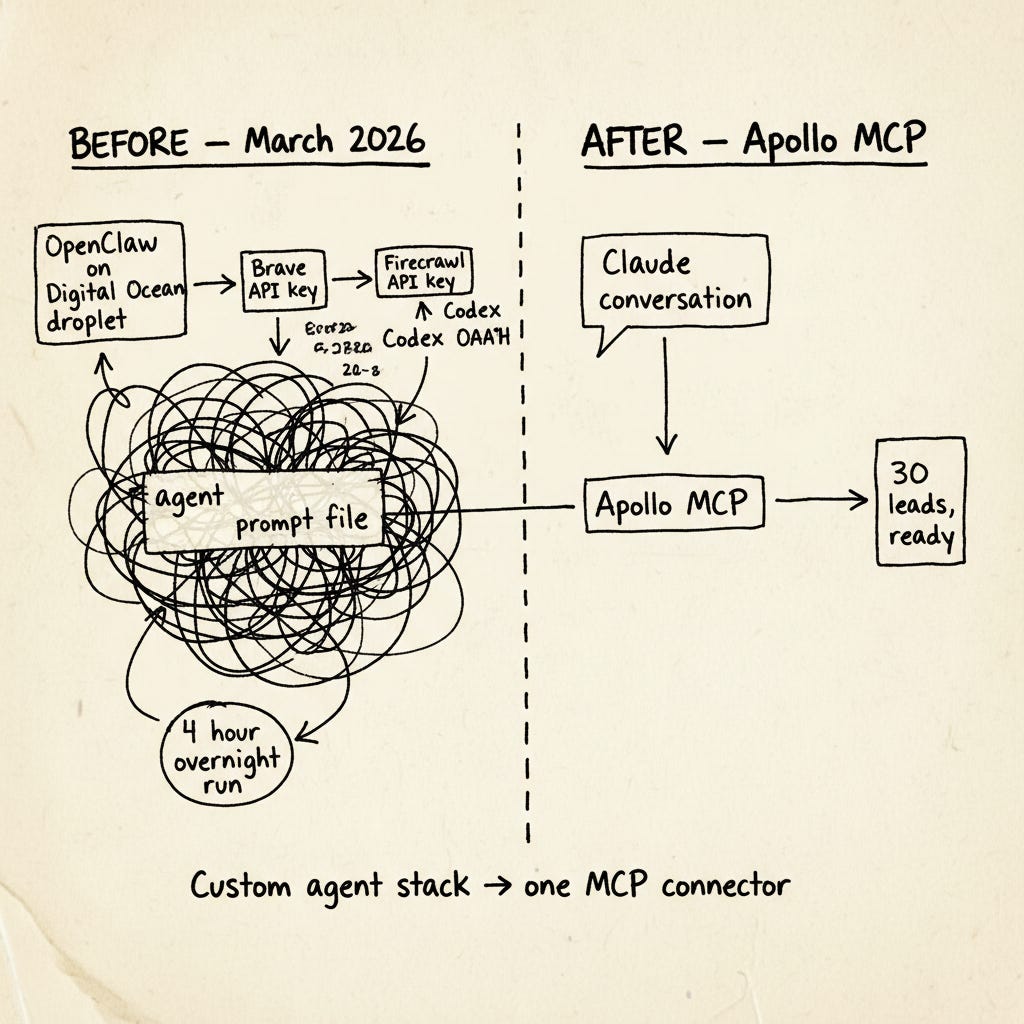
The story. In March 2026 we needed a part-time sponsorship manager for Creators AI. To source candidates I built an agent on OpenClaw running on a Digital Ocean droplet, with Codex via OAuth, a Brave Search API key, a Firecrawl key, and a long Claude Code prompt that paginated through LinkedIn, Twitter, Upwork, Reddit, and four newsletter communities. The output was a CSV: name, role, sponsorship-experience signal, AI/SaaS niche flag, contact channel, relevance score.
Btw we are still hiring 🙂 Share this post with person who could be interested in helping us with sponsorships & sales
It worked. Setup took the better part of a day. The agent itself ran four hours overnight.
That was the before.
The after. Apollo MCP launched in beta on February 24, 2026. One connector. One OAuth flow. No API keys. The same job — find 30 people in the AI/SaaS space who’ve sold newsletter or podcast sponsorships in the last 12 months, currently freelance or open to work, return name, role, company, verified email, LinkedIn — collapses into one Claude conversation.
Claude, search Apollo for VPs of Sales and Partnerships at AI/SaaS companies under 200 employees, currently in roles tagged "newsletter" or "media sales" or "creator economy". Return 30, sorted by likelihood of being open to a side project. Cross-check against our existing CRM and exclude anyone we've already contacted.Two minutes for the query. Minutes more for spot-checking the results before outreach.
The numbers behind this aren’t anecdotal. Anthropic’s own Apollo case study cites:
- 35% boost in meeting bookings with Claude-powered messaging
- 80% reduction in email writing time for sales reps at FLO EV Charging
- 40% decrease in prospecting time for account executives at Qualytics
Those are the receipts that matter when you’re deciding whether to retire a custom agent stack.
My honest lesson: when MCP exists for your category, you almost certainly should not be running a custom agent. Reserve that engineering effort for the cases where MCP genuinely doesn’t exist yet — which is exactly where UC2 (the image MCP build) came from.
Follow Up With Them (CRM + Gmail, the Solopreneur Sales Engine)
Finding leads is half the loop. The other half — the one nobody writes about — is the daily grind of actually following up with them. Same problem shape as UC3 but on a different rhythm: not one big batch, but every single day for the rest of the relationship.
Before: Open CRM, find today’s follow-up tasks, read each contact’s history, recall what you last discussed, switch to Gmail, write the email, send. Thirty to forty-five minutes a day. The writing isn’t the hard part — the context-loading tax of remembering each relationship is.
After: One Claude conversation reads the CRM, drafts each follow-up in your voice referencing the last interaction, and puts the drafts in Gmail. You review at 8:05am and send. Five minutes total.
For every contact in Attio with a "follow up today" task, pull the last 3 interactions, draft a follow-up referencing what we last discussed, match my voice (read tone guide in Notion), and put each one in Gmail drafts. Do not send.This is MCP-only. Memory can’t see today’s CRM tasks. Projects can’t see today’s email thread history. Skills don’t write to Gmail. Three live reads plus one write equals three connectors in one prompt — the entire pitch for MCP in one workflow.
The real receipts:
The cleanest case study I’ve found is The Circuit’s How to Build a Sales Engine With Claude Code (April 13, 2026). A solopreneur combined Apollo for company data, Attio MCP for the CRM, Perplexity for desk research, and a custom Gmail MCP for outreach drafts. The full system cuts 20+ hours of sales admin to minutes of review per batch, at roughly EUR 100 in total tooling costs. The pattern is the same one I described above — and exactly the shape most creator-businesses need.
If you’re on HubSpot instead, Patrick Schaber’s HubSpot Follow-up Engine (covered in the Build to Launch creator survey) hits the same outcome: daily 8am task that connects to HubSpot, surfaces all follow-up tasks due that day, reads call and meeting notes from each contact record, and builds a draft email in his voice. Drafts land in Gmail. He edits and sends at 8:05.
“It easily saves me a half hour to 45 minutes a day not having to research each contact and prepare the emails from scratch myself.” — Patrick Schaber
The takeaway for picking a CRM: if you don’t have one yet, Attio’s free tier is the cleanest entry point for solo creators. If you’re already on HubSpot, the official connector works. If your CRM is Notion, the Notion MCP covers it. The pattern survives the tool choice.
Setup in 10 Minutes ⏱️
Single technical section. Skim-friendly.
Step 1: Install Claude Desktop
Step 2: Pick One MCP Server
Start with Drive or Brave Search. Both have obvious safe scopes, both deliver value immediately. Save Apollo and CRM connectors for week two.
Step 3: Add the Server
- Open Claude Desktop → Settings → Customize → Connectors
- Click
+next to “Connectors” - Pick from the Web list (Gmail, Drive, Notion, Apollo, HubSpot, Attio, Shopify, etc.) or paste a custom MCP URL
- For remote MCPs: OAuth opens a browser, grant the scopes you want
- For local installs: paste the config snippet from the README
Step 4: Pick Tool Permissions
After connecting, Claude Desktop shows the tool list per connector. Per-tool, you can set:
- auto-allow (check) — runs without asking
- ask each time (hand icon) — confirms before each call
- block (no-entry) — denies the tool entirely
For the first run, leave everything on ask each time so you see exactly what Claude does. Move to auto-allow later, per tool, only after you’ve seen it behave reliably.
Step 5: Verify
- Restart Claude Desktop
- Test: “List my last 5 [Drive docs / Apollo contacts / Attio records]”
- If results come back, you’re connected
- If not, check Help → Logs
What NOT to Give MCP 🚫
Every MCP server you install is a trust delegation. Decide scope before convenience.
- Always prefer read-only when the server offers it. Write access is a separate decision per server, not a default.
- Never connect payment or banking APIs, password managers, financial spreadsheets with account numbers. There’s no good reason and the blast radius if something goes wrong is unbounded.
- Audit the tool surface. A server can expose tools you didn’t expect. In Claude Desktop, hover the MCP icon to see registered tools. Anything labeled
delete_*,transfer_*, orsend_*deserves a pause and a decision. - Scope by integration, not by server. Notion lets you connect MCP to a single page or database. Use that. Don’t connect “all of workspace.” Same for Gmail (one Gmail account, ideally a dedicated one for AI workflows, not your primary).
- Prompt injection is the unavoidable risk. A document inside your Notion can contain instructions trying to make Claude do something else. Mitigation: keep destructive tools on ask each time, never auto-allow. Review Claude’s plan before letting it write.
One creator-specific tip worth stealing: Tolani at Creator Success Club described creating a separate Gmail account and a separate Google Calendar specifically for Claude — forwarding in only what she wants Claude to see. That’s the right instinct. The smallest blast radius is the safest one.
For the broader security picture, the recent finding that 41% of official MCP servers lack authentication (covered in our Feb 27 weekly digest) is worth keeping in mind. Vet your servers.
Closing
What I deliberately did NOT automate: writing decisions, voice choices, the “should we send this” call. MCP is for context retrieval and rote ops. Voice and judgment are still mine.
One honest take: MCP in 2026 is still slightly messy. Server quality varies, auth flows differ, some launches are PR with no real product behind them. But the trajectory is clear, and the cost of waiting is real time saved every week.
One CTA. Pick one of the four use cases above. Time yourself doing it the old way once. Install the server. Do it again. If MCP doesn’t save you at least 10 minutes on that one task, turn it off. The receipts decide — not the hype.
Which use case will you try first? Drop a comment — I want to see what actually breaks for people, not just what works.
If you missed our previous updates, don’t worry, here they are:
Perplexity Computer, Nano Banana 2, Samsung AI Phone | Weekly Digest
This article was first published in the Creators AI newsletter. View the original edition.